

In this article
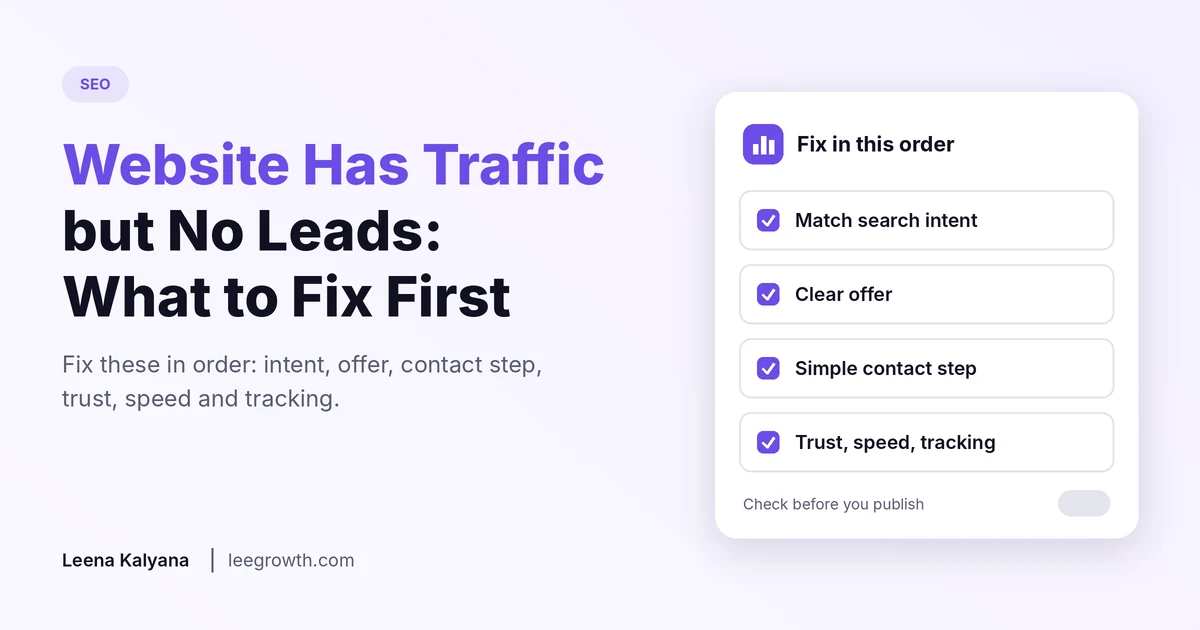
Traffic without leads usually means one of three things: the visitors are the wrong people, the page does not give them a reason to act, or acting is too hard. Fix them in that order, because there is no point improving a button that the wrong people see.
Last updated: 21 November 2026. Google’s tools and thresholds below were checked against Google’s help pages on that date. Written by Leena Kalyana, Digital Marketing and SEO Consultant, Delhi NCR.
I am Leena Kalyana, and this is the order I use when a client says “we have visitors but no calls”. The order matters more than any single fix. A business that rewrites its contact form while ranking for the wrong searches fixes the wrong problem.
In short
- Confirm first that you really have no leads, because untracked leads look like no leads.
- Check who visits, then whether each page matches the search, then whether the offer, the contact step and the trust signals work.
- Fix speed and mobile use next, then measure calls, WhatsApp clicks and form sends.
- Change one thing at a time, and give each change enough visitors before judging it.
- A structured review helps when you have tried these steps and still see no change.
What does “traffic but no leads” mean?
It means visitors reach your site and almost none of them call, message or send a form. A lead is any of those three actions: a phone call, a WhatsApp message or a form enquiry.
Three causes explain nearly every case:
| Cause | What it looks like | Where it is fixed |
|---|---|---|
| Wrong visitors | Traffic comes from searches that never turn into customers | Steps 1 and 2 |
| No reason to act | The page does not say what you offer, what it costs or what happens next | Steps 3 and 5 |
| Acting is too hard | Buttons are hidden, forms are long, pages are slow on a phone | Steps 4 and 6 |
The causes stack. Wrong visitors make every other fix look useless, which is why Step 1 comes first.
Before you start: do you really have no leads?
Check that the leads are missing, not just unrecorded. Many “no leads” sites receive enquiries that nobody tracks, such as calls from a copied number or WhatsApp messages from a button.
Run this five-minute check:
- Ask your team how many calls, WhatsApp messages and forms arrived in the last 30 days.
- Check the spam folder of the email address that receives form submissions.
- Send a test form from your phone and time how long it takes to reach a human.
- Compare the totals with what GA4 shows as key events, if you have set that up.
A site where the team counted 20 enquiries and GA4 recorded 3 has a measurement problem, not only a conversion problem. My guide on how to track enquiries in GA4 fixes the measurement side, and Step 7 below covers it in brief.
Which five numbers should you pull first?
Pull five numbers before changing anything: top search queries, top landing pages, mobile share, enquiry count and your own enquiry log. They turn a vague feeling into a diagnosis.
| Number | Where to find it | What it tells you |
|---|---|---|
| Top 20 search queries | Search Console → Performance → Queries | Who your visitors are |
| Top 10 landing pages | GA4 → Reports → Engagement → Landing pages | Where visitors arrive |
| Share of visits on mobile | GA4 → Reports → Tech → Overview | Whether phone use matters most |
| Enquiries by type | GA4 key events, once set up | Which action works |
| Enquiries received | Your own log | The real total |
Save these numbers in one sheet with today’s date. After each fix you compare against them.
Which symptom points to which step?
Match your symptom to a step before you start work.
| Symptom | Likely cause | Go to |
|---|---|---|
| Most visits come from informational searches | Wrong visitors | Step 1 |
| Visitors land on a blog page when they searched for a service | Page does not match the search | Step 2 |
| Visitors read the page and leave without contact | Offer unclear or trust missing | Steps 3 and 5 |
| Many people start the form and few send it | Contact step too hard | Step 4 |
| Visits drop off on mobile only | Speed or mobile layout | Step 6 |
| Team reports enquiries that analytics never shows | Measurement gap | Step 7 |
Step 1: Who is visiting your site?
Open the Search Console Performance report and classify each top search as one of four types: service, local, informational or brand. Ask whether someone typing that search is a customer.
The Queries tab of the Performance report lists the searches that brought people to your site. Google states that the tab shows up to 1,000 top queries and hides rare ones to protect privacy. Read Google’s Performance report overview for the setup.
Sort the top 20 queries into four groups. The examples below are hypothetical, for a physiotherapy clinic in Delhi.
| Query type | Example search | Likely to bring a lead? |
|---|---|---|
| Service | back pain physiotherapy clinic | Yes |
| Local | physiotherapist near me Dwarka | Yes |
| Informational | back pain exercises at home | Rarely by itself |
| Brand | the clinic’s own name | Yes, but from people who already know you |
Google also describes how to separate branded from non-branded queries in its common tasks guide. Branded traffic often comes from people already familiar with your site. Non-branded traffic shows whether new people find you.
Apply this decision rule:
- Mostly service and local queries with no leads: the visitors are right, so move to Steps 2 to 6.
- Mostly informational queries: the traffic is not wrong, but it will not bring calls alone. Build pages for service and local searches. My guide on how to get more customers online covers the searches that bring customers, and my local SEO service page explains the work for near-me searches.
- Mostly brand queries: the site converts people who already know you and does not reach anyone new.
Also open GA4’s Traffic acquisition report and compare channels. Organic Search, Paid Search, Social and Direct often convert at very different rates. Search Console and GA4 count visits differently, so compare trends in each, not exact totals between them. My Search Console guide for small businesses shows how to read the data.
Step 2: Does each page match the search?
Every page that gets traffic should answer the question the visitor arrived with and show one next step. A visitor who searched for a service and lands on a general blog page has no clear way forward.
Check your top 10 landing pages with three questions:
- What did the visitor search? Use the Queries tab filtered by that page.
- Does the first screen answer it? The answer should appear without scrolling.
- What is the next step? Ask for a quote, book a call or send a message, in one clear button.
Fix mismatches in one of two ways:
- Send service searches to a service page. If the right page does not exist, create it.
- Add a next step to every informational page. A guide on back pain should end with a link to the treatment page and a booking button.
Give each page one job. A page that tries to explain, sell and collect newsletter sign-ups does none well. My landing page checklist for a local business lists the checks for a page that must produce enquiries.
Step 3: Is the offer clear?
Say what the visitor gets, what it costs or how pricing works, and what happens after they contact you. A visitor who is unsure what happens next usually does nothing.
A clear offer answers five questions on the page:
- What exactly do you do?
- Who is it for?
- What does it cost, or how is the price decided?
- What happens after I contact you?
- How long until I hear back?
A weak page says: We offer comprehensive physiotherapy solutions. A stronger page, again hypothetical, says: Back, neck and knee pain treatment in Dwarka. The first assessment takes 45 minutes and the price is shown before you book. Call or WhatsApp, and we reply within one working hour.
Pricing deserves a decision. A page can show a price, a starting price, or an explanation of how pricing works. A page that shows nothing makes the visitor guess, and guessing visitors leave.
Step 4: Is contact easy?
Make contact possible in one tap on a phone, with the fewest fields and a clear confirmation. Every extra step loses some visitors.
Check each item:
- A visible call and WhatsApp button on mobile. Both should appear without scrolling and stay reachable as the visitor scrolls.
- A short form with only the fields you need. Name, phone number and one line about the need are enough for most services.
- A clear confirmation after sending. The visitor should see what happens next.
- Working hours and a reply-time promise you can keep. A promise you cannot keep costs more trust than no promise.
Then test it yourself, from a phone:
- Tap the call button. Confirm it opens the dialler with the right number.
- Tap the WhatsApp button. Confirm it opens a chat with the right number. WhatsApp’s click-to-chat links can carry a prefilled message, so the visitor starts with the page’s topic already typed.
- Submit the form. Confirm it arrives in the right inbox, not in spam.
- Time your reply. Speed matters, and my guide on how to get more customers online explains why replying fast wins the customer.
A broken form is the most expensive silent failure on a site. Check delivery monthly. If WhatsApp is your main channel, my WhatsApp marketing service page explains how I help businesses use it well.
Step 5: Is there trust next to the action?
Place real reviews, a photo of the person they will speak to, and clear business details next to the contact button. An about page that nobody visits does not carry trust.
Visitors decide near the button. Put proof within one scroll of every contact button:
- Real reviews with the reviewer’s name and the source, such as Google. Never invent or edit a review.
- A photo of the person they will speak to, ideally you or your team.
- Clear business details: address, phone number, working hours and the business name.
- Policies that matter to the buyer, such as how appointments or refunds work.
Add proof only if it is true. Three honest reviews beat thirty vague ones. A site with no reviews yet should say what it can: who runs the business, what experience they have, and what happens at the first contact.
Step 6: Are speed and mobile use holding you back?
Test the page on a real phone and on PageSpeed Insights, then fix the biggest delays first. A slow page loses visitors before they read anything.
PageSpeed Insights reports two kinds of data. Lab data comes from a simulated load of the page. Field data comes from real users over the previous 28 days. Google’s guide to PageSpeed Insights explains the difference and states that lab data helps with debugging while field data shows real experience.
Use these Google thresholds for the three Core Web Vitals:
| Metric | What it measures | Good |
|---|---|---|
| Largest Contentful Paint (LCP) | How fast the main content appears | 2.5 seconds or less |
| Interaction to Next Paint (INP) | How fast the page responds to taps | 200 milliseconds or less |
| Cumulative Layout Shift (CLS) | How much the page jumps while loading | 0.1 or less |
The biggest delays on small-business sites are often heavy images, large sliders and too many plugins or scripts. Fix in this order: compress the largest image on the first screen, remove what the page does not need, then ask a developer to check the rest. A new site build or a website maintenance plan can cover this, and a WordPress developer can fix the deeper causes.
Do not chase a perfect score. Chase a page that loads quickly for the phones your visitors use, on the mobile data they have.
Step 7: Are you measuring the right thing?
Count calls, WhatsApp clicks and form sends, not just visits. Without that, you cannot tell what is working.
In GA4, enquiry actions become key events. A key event is an event you flag as important, and GA4 then adds a Key events column to reports such as Landing pages. Google describes this in its overview of key events. My guide on how to track enquiries in GA4 walks through each setup step, and my guide on tracking calls and direction requests from Google Maps covers the calls GA4 cannot see.
Keep one more number outside GA4: an enquiry log with the date, channel and outcome of every enquiry. GA4 counts actions, and only your log shows which became customers.
How do you know which fix worked?
Change one thing at a time, wait for enough visitors, then compare against the numbers you saved at the start. Several changes at once make the result impossible to read.
Follow these rules:
- Change one element per page, such as the headline, the button or the form.
- Write down the date of every change.
- Wait for enough visitors. A page with a few visits a week needs several weeks.
- Compare like with like. Use the same days and the same channel.
- Keep the change only if enquiries rise and nothing else moved.
Small changes, such as a clearer button, can show results within days or weeks. Large changes such as new service pages take longer, because search engines need time to find and rank them.
What if your traffic comes from ads?
Fix the page before you raise ad spend. Ads bring visitors, and a page that does not convert turns each click into a lost cost.
Check three things in your ad account. First, the search terms that triggered your ads: are they buyer searches or curious searches? Second, whether each ad lands on the page that matches its promise. Third, whether your calls, WhatsApp clicks and form sends are tracked as results. My Google Ads management service page explains how I run search ads for ready-to-buy customers.
When should you get help?
Get help when you have tried these steps and still see no change. A structured review can find what you cannot see yourself.
My website conversion audit reviews up to five key pages on phone and computer, with a written report, a ranked list of fixes and a walkthrough, at a fixed price. If you are unsure whether you need it or an SEO audit, read website conversion audit vs SEO audit. For a wider list of causes, see why your website is not getting enquiries.
An audit finds problems and gives a plan. It does not raise your enquiries by itself, and I do not promise a conversion rate.
Frequently asked questions
How much traffic do I need before leads appear?
There is no fixed number. A small site with the right visitors can get steady enquiries, while a large site with the wrong visitors can get none.
Can ads fix a no-leads problem?
Ads bring visitors, but if the page does not convert, you pay for clicks that go nowhere. Fix the page first or alongside the ads.
How soon can I see changes after fixing the page?
Small changes, like a clearer button, can show results in days or weeks. Give each change enough time and enough visitors before judging it.
Is this a traffic problem or a conversion problem?
Check the visitors first. If most queries are service or local searches and enquiries stay low, it is a conversion problem. If most queries are informational, it is a traffic-quality problem.
Should I redesign the whole website?
Not before you diagnose it. A redesign built on the wrong visitors or a missing offer repeats the same result. Fix the highest-impact page first and measure.
What if most of my traffic is from my own brand name?
Your site then serves people who already know you. Build service and local pages for searches from people who do not yet know you.
Can I do this myself?
Yes, for Steps 1 to 5 and the checks in Step 7. Bring in a developer for speed fixes and complex forms, and bring in a reviewer when you need an outside view.
How was this guide checked?
I read Google’s help pages on 21 November 2026. They cover the Search Console Performance report, PageSpeed Insights and Core Web Vitals thresholds, and GA4 key events. The order of steps, the five-minute reality check, the one-tap contact test, the one-change rule and the physiotherapy examples come from my own review method and general conversion practice. The guide labels them that way. It contains no client results. Google updates its tools often, so I refresh this page when a step changes.
Want help finding what is holding your site back?
Send me your website and I will tell you what I would fix first, with no obligation. Start with the free website SEO audit, or book a free consultation. If you want more enquiries from a wider plan, see my lead generation service for small businesses.
Google sources
- Performance report (Search results): Overview and basic setup
- Performance report (Search results): Common tasks and use cases
- About PageSpeed Insights
- About key events (GA4)

Leena Kalyana is an SEO and digital marketing consultant in Delhi NCR and the founder of LeeGrowth. She helps clinics, coaching institutes, consultants and small businesses get found on Google, Google Maps and AI search. She works directly with every client and does not guarantee rankings.