In this article
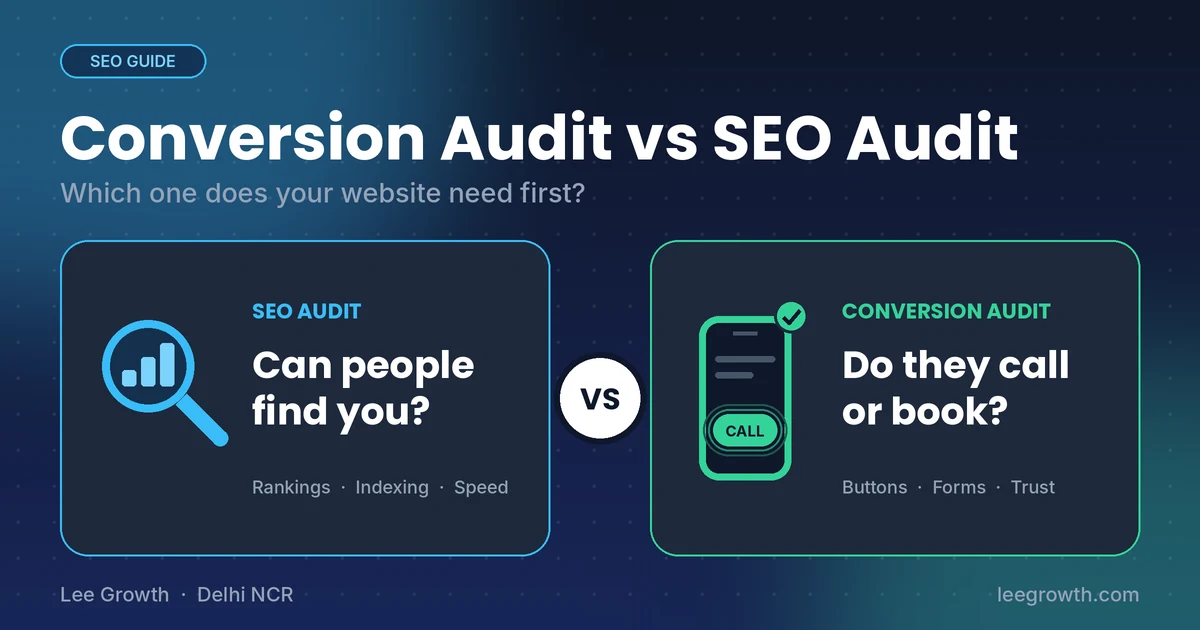
Quick answer: Conversion audit vs SEO audit comes down to one question. An SEO audit checks if people can find your website on Google. A conversion audit checks if visitors act once they arrive, for example by calling, booking or sending an enquiry. If few people visit, start with SEO. If many people visit but few contact you, start with a conversion audit.
Your website may have a visibility problem or an action problem. They look the same from the outside (no new customers), but the fixes are different. If you fix the wrong one first, you lose time and money.
This guide explains the conversion audit vs SEO audit difference in plain words, and gives you a 10-minute test to find out which problem you have.
Key takeaways
- SEO is about being found. Conversion is about being chosen.
- Three numbers tell you where you are losing people: impressions, clicks and enquiries.
- Some fixes help both (page speed, mobile layout, clear page titles).
- For local businesses in India, calls and WhatsApp clicks are often the real “sale”. Track them first.
- No honest audit can promise rankings or a fixed number of leads.
In This Guide
- What is the difference between an SEO audit and a conversion audit?
- What is an SEO audit?
- What is a conversion audit?
- How do I find where my website is losing people? (10-minute test)
- Where do the two audits overlap?
- Conversion audit vs SEO audit: which should I do first?
- What changes for local businesses in Delhi NCR?
- 30-minute self-check you can do today
- What should a good audit report include?
- What should I fix first?
- Does this matter for AI search?
- Common mistakes to avoid
- Frequently asked questions
What is the difference between an SEO audit and a conversion audit?
An SEO audit looks at how well Google can find, understand and rank your pages. A conversion audit looks at what visitors do after they land. One is about getting people to your page. The other is about what happens next.
Think of a shop. SEO gets people to the shop door. Conversion gets them to walk in and ask for something.
| SEO audit | Conversion audit | |
|---|---|---|
| Main question | Can people find my site? | Do people act when they arrive? |
| Focus | Google visibility and rankings | Visitor behaviour and enquiries |
| Looks at | Indexing, technical health, keywords, content, links | Page message, buttons, forms, trust, mobile experience |
| Main data | Google Search Console, site crawl | Google Analytics 4 (GA4), heatmaps, session recordings, form data |
| Typical fixes | Page titles, headings, internal links, speed, structured data | Button position, page copy, form length, reviews and proof |
| Success looks like | More impressions, clicks and better rankings | More calls, bookings and form submissions |
| Best when | Traffic is low | Traffic is fine but enquiries are low |
What is an SEO audit?
An SEO audit is a check of how well your website can be found on Google. It answers one question: “Why am I not showing up for the searches that matter?”
It usually checks:
- Indexing: Are your important pages in Google’s list of pages? If not, they cannot appear in search.
- Technical health: Slow pages, broken links, bad redirects, mobile problems and sitemap errors.
- On-page SEO: Page titles, meta descriptions and headings. Do they match what people search?
- Content: Does each page answer the question the searcher has?
- Internal links: Do your pages link to each other in a clear way?
- Local signals: Google Business Profile, listings and a matching name, address and phone number everywhere (for local businesses).
- Competing pages: Do two of your own pages fight for the same search?
The result is a list of fixes that help your pages get found. You can see how my website SEO audit works.
What is a conversion audit?
A conversion audit is a check of what visitors do after they land on your site. It answers a different question: “Why are people visiting but not contacting me?”
In this guide, a “conversion” means any action that helps your business: a call, a WhatsApp message, a booking or a form submission.
It usually checks:
- First impression: Can a new visitor tell what you do, and who it is for, in about five seconds?
- Calls to action (CTAs): A CTA is a button or link that asks the visitor to act, such as “Call now” or “Book a visit”. Is it easy to see on a phone?
- Forms: Too many fields scare people away. Does the form work, and does the message reach you?
- Trust: Real reviews, photos, credentials, clear contact details and honest price information.
- Page flow: Does each page lead to one clear next step?
- Mobile experience: Can someone tap to call or message you without zooming?
- Tracking: Are calls, WhatsApp clicks and form submissions being counted? If not, you are guessing.
The result is a list of changes that help more of your existing visitors take action.
How do I find where my website is losing people? (10-minute test)
Most guides tell you to “look at your data” and stop there. Here is a simple way to do it. People are lost at one of four points. Find the point where most are lost, and you know which audit to start with.
Step 1: Get four numbers for the last 3 months.
| Number | Where to find it |
|---|---|
| 1. Impressions (times your site was shown on Google) | Google Search Console → Performance |
| 2. Clicks (people who clicked from Google) | Google Search Console → Performance |
| 3. Engaged visits (people who stayed and did something) | GA4 → Reports → Engagement |
| 4. Enquiries (calls, WhatsApp clicks, form submissions) | GA4 key events, your phone log, your inbox |
Step 2: Compare the numbers to each other, not to a “perfect” benchmark. Every business is different. Ask where the biggest drop is.
Step 3: Match the drop to a leak.
| Where people are lost | What it usually means | Start with | First thing to check |
|---|---|---|---|
| Leak 1: Very few impressions | Google is not showing your pages for useful searches | SEO audit | Are the pages indexed? Do you have a page for each service? |
| Leak 2: Many impressions, few clicks | You are shown, but your listing does not win the click | SEO audit | Page titles and descriptions, and your ranking position |
| Leak 3: Clicks are fine, but visitors leave fast | The page is slow, or does not match what the searcher expected | Conversion audit | Page speed on a phone, and whether the top of the page matches the title they clicked |
| Leak 4: Visitors stay, but do not contact you | The next step is unclear, hidden, broken or not trusted | Conversion audit | Call button, form, reviews, and whether your tracking works |
Step 4: Compare your best page with your worst page. Pick the page that gets the most enquiries and the page that gets the fewest, with similar traffic. Put them side by side on your phone. The difference (button, headline, proof, form) is often your first fix.
A fifth leak is invisible: if you cannot count enquiries at all, tracking itself is the problem. Fix that before anything else, because without it you cannot tell which audit helps.
Where do the two audits overlap?
Some checks matter to both Google and your visitors.
| What is checked | SEO audit | Conversion audit |
|---|---|---|
| Indexing and crawl errors | Yes | No |
| Keywords and search intent | Yes | No |
| Backlinks and local listings | Yes | No |
| Page speed | Yes | Yes |
| Mobile layout | Yes | Yes |
| Page titles and headings | Yes | Yes |
| Clear message at the top of the page | Partly | Yes |
| Reviews and trust signals | Partly (local SEO) | Yes |
| Buttons and calls to action | No | Yes |
| Forms and booking flow | No | Yes |
| Conversion tracking | No | Yes |
Three overlaps are worth knowing:
- Page speed. A slow page makes visitors leave before they act. Speed is also part of Google’s page experience checks.
- Mobile layout. Google mainly uses the mobile version of your site for indexing. Many local visitors are also on phones. A broken mobile layout hurts both.
- Titles and headings. A clear title helps Google understand the page. It also tells the visitor what to expect.
Conversion audit vs SEO audit: which should I do first?
Ask one question: “Do I need more visitors, or more enquiries from the visitors I already have?”
Start with an SEO audit if:
- Your site gets very little traffic from Google
- Your pages do not show up for the services you offer
- Your Google Business Profile gets few views
- Your traffic dropped after a redesign or a site move
- You suspect pages are not indexed, are slow, or are duplicated
Start with a conversion audit if:
- You get a fair number of visitors but very few enquiries
- Visitors leave quickly without clicking anything
- Most visitors use phones, but the site feels made for a desktop
- You are about to pay for ads or SEO and want the site ready first
Do both if:
- Your site is new
- You are redesigning or moving your site
- You want a full picture before paying for monthly SEO
If traffic and enquiries both look fine, you do not need an audit first. You need a content plan: which new pages and topics will bring more of the right people.
Three examples (illustrative, not real client data)
Example 1: A physiotherapy clinic with 20 visits a month. A conversion audit will not help much, because almost nobody is there to convert. The clinic needs an SEO audit and local SEO work first. This is Leak 1.
Example 2: An interior designer with many impressions but few clicks. Search Console shows the site is shown often, but most page titles just say “Home” or “Services”. People see the listing and scroll past. Rewriting titles to say what the page offers is a much cheaper fix than a redesign. This is Leak 2, so it is an SEO fix.
Example 3: A dental clinic with steady visits and no enquiries. Visitors read the page and press “Book appointment”, but the form sends emails to an old address nobody checks. Nothing is broken on Google. The leak is on the page. This is Leak 4, so it is a conversion fix, and it takes ten minutes.
The same website can have more than one leak. Fix the biggest one first for the quickest result.
What changes for local businesses in Delhi NCR?
Most guides are written for online shops or software companies. A local service business works differently. Here is what to watch.
- Calls matter more than forms. Many people will tap a phone number rather than fill a form. Put a tap-to-call button in the header on mobile.
- Count WhatsApp clicks. For many local businesses, WhatsApp is the first contact. If you do not track it, you will think the site is doing worse than it is.
- Your Google Business Profile is part of the picture. Calls made from your profile show in the profile’s own performance data, not in your website analytics. Add both when you count enquiries.
- Search the way your customers do. In Search Console, open the Queries list and read the real phrases people typed. Some may be Hinglish or short local phrases. Use the words your customers use, naturally, in your headings and page text.
- Make service-area pages only for places you really serve. One honest page per area, with real details (areas covered, how you work, local reviews), is fine. Copy-pasting the same text with a new city name is thin content and does not help.
- Keep your name, address and phone number the same everywhere. Use the same spelling on your site, your profile and your listings.
30-minute self-check you can do today
You do not need a paid tool for a first look. Free tools are enough. See my list of free SEO tools for small businesses in India.
Visibility checks (SEO)
- [ ] Search
site:yourwebsite.comon Google. Are your main service pages listed? - [ ] Open Search Console → Pages. Are important pages marked “not indexed”?
- [ ] Search for your main service plus your area. Do you appear? Does your Google Business Profile appear?
- [ ] Run your top pages through Google PageSpeed Insights. Check the mobile score.
Action checks (conversion)
- [ ] The 5-second test. Open your homepage on your phone. Can you find the call or booking button in 5 seconds?
- [ ] The thumb test. Can you reach the main button with one thumb, without zooming?
- [ ] The call test. Tap your own phone button. Does it open the dialler with the right number?
- [ ] The form test. Fill in your own contact form. Did the message reach you, and how fast?
- [ ] The stranger test. Ask someone who does not know your business to find your phone number and say what you do. Watch where they get stuck.
- [ ] The message-match test. Click your own listing from Google. Does the top of the page match what the title promised?
- [ ] The tracking test. In GA4, can you see tap-to-call, WhatsApp clicks and form submissions as separate events? In GA4, important actions can be marked as “key events” (called “conversions” in older versions).
If you cannot do the last test, setting up tracking is the first job of any conversion audit.
What should a good audit report include?
Not every audit is useful. Before you pay for one, check that the report gives you:
- A short, ranked to-do list. The most useful fixes first, not 200 items in random order.
- Proof for each point. A screenshot, a number, or a page link.
- A plain reason for each fix. Why it matters, in simple words.
- An effort estimate. Is it a ten-minute change or a two-week project?
- A tracking plan. How you will know if each fix worked.
- No guarantees. Nobody can promise page-one rankings or a set number of leads.
Five questions to ask before you buy an audit
- What exactly is covered? (“Audit” means different things to different people.)
- Will I get a ranked list, or only a score?
- Do you check the site on a real phone?
- Will the audit look at my calls and WhatsApp clicks, or only website forms?
- Who will fix the issues, and is that included?
What should I fix first?
After an audit, you will have a long list. Do not try to fix everything at once. Sort the list by effort and likely impact. This table shows typical examples as a general guide. Your own audit may rank things differently.
| Fix | Effort | Likely impact | Audit type |
|---|---|---|---|
| Fix a form that does not send messages | Low | High | Conversion |
| Add a tap-to-call button in the mobile header | Low | High | Conversion |
| Set up call, WhatsApp and form tracking | Low to medium | High over time | Conversion |
| Rewrite titles on your top 5 pages so they say what the page offers | Low | Medium | SEO |
| Add reviews and real photos near the main button | Low to medium | Medium | Conversion |
| Fix slow images and heavy pages | Medium | Medium | Both |
| Write a separate page for each main service | High | High over time | SEO |
| Full redesign | High | Uncertain | Both |
A good rule: do the low-effort, high-impact fixes this week. Plan the bigger work for later, once tracking tells you what is working.
Does this matter for AI search?
More people now get answers from AI tools and from AI summaries at the top of Google. No one can promise your site will be picked. But the same habits that help visitors also help machines understand your page:
- Say what a page is about in the first lines. A clear one- or two-sentence answer near the top is easy for people and for AI tools to use.
- Use clear question headings. “What is a conversion audit?” is easier to understand than a vague heading.
- Show who wrote the page. A real author, a short bio and a “last updated” date help readers trust the page.
- Keep your business details the same everywhere. Your name, services and location should match on your site, your Google Business Profile and your listings.
- Be specific. A page with real steps, real examples and clear limits is more useful than a page of general advice. That is true for people and for AI tools.
Tracking also matters here. See how to measure organic search visibility beyond rankings.
Common mistakes to avoid
- Redesigning the site to fix low traffic. A new design does not fix a visibility problem.
- Paying for SEO when the site cannot convert. You may get more visitors and the same number of enquiries.
- Treating rankings as the goal. Rankings only matter if they lead to calls, bookings or sales.
- Skipping tracking. Without it, you cannot tell which audit you need.
- Fixing everything at once. Start with the low-effort, high-impact items.
- Not asking what is covered. “Audit” can mean very different things.
- Counting only website forms. For many local businesses, most enquiries come by phone or WhatsApp.
- Believing guarantees. Be careful with anyone who promises rankings or a fixed number of leads.
Frequently asked questions
What is the main difference between a conversion audit and an SEO audit?
An SEO audit checks if people can find your website on Google. A conversion audit checks if visitors take action once they arrive. SEO is about visibility. Conversion is about results from the visitors you already have.
Which should I do first, an SEO audit or a conversion audit?
If your site gets little traffic, start with an SEO audit. If it gets fair traffic but few enquiries, start with a conversion audit. If your site is new or being redesigned, do both. Use the 10-minute test above to decide.
Is a website audit the same as a conversion audit?
No. A website audit is a wider review that can include SEO, conversion, speed, security and accessibility. A conversion audit only looks at what visitors do after they land. If a provider offers a “full website audit”, ask what is covered.
Can an SEO audit improve conversions?
Sometimes, in an indirect way. Fixing slow pages, broken mobile layouts and unclear page titles can help visitors stay and act. But an SEO audit does not look closely at button position, form design or trust signals. A conversion audit does.
Can a conversion audit improve my rankings?
Not directly. Conversion changes aim to turn visitors into enquiries, not to move pages up on Google. A clearer, faster, easier site can help your SEO work over time, but it is not a ranking fix.
Can I do these audits myself?
You can do a useful first check yourself with free tools. Use the 30-minute self-check above. A professional audit helps when you cannot find the cause, when you need a ranked plan, or when you do not have time to fix things yourself.
How often should I audit my website?
A sensible rhythm is a quick monthly look at your four numbers (impressions, clicks, engaged visits, enquiries). Do a full audit before a redesign or site move, after a sudden traffic drop, or when you plan to start paid ads or monthly SEO.
Do I need both audits for a local business?
Many local businesses benefit from both. They rely on Google search and Maps to be found, and on a clear mobile page to win the call. If you are not sure where to start, a short review can show which leak is bigger.
Does a conversion audit help with AI search?
Not directly. But clear answers, question headings, a named author and consistent business details help people and AI tools understand your pages. No one can guarantee that an AI tool will mention your business.
Do you guarantee results from an audit?
No. An audit shows you what to fix and in what order. Rankings and enquiries depend on your competition, your services, how much of the list you complete, and how long you give it.
Not sure which audit you need?
Still unsure about conversion audit vs SEO audit for your site? Send me your website and tell me whether your problem is low traffic or low enquiries. I will tell you honestly which one to start with. You can request a free website SEO audit, or get in touch if you are a Delhi NCR business with a conversion question.
Related reading
- How to Measure Organic Search Visibility Beyond Rankings
- Best Free SEO Tools for Small Businesses in India

Leena Kalyana is an SEO and digital marketing consultant in Delhi NCR and the founder of LeeGrowth. She helps clinics, coaching institutes, consultants and small businesses get found on Google, Google Maps and AI search. She works directly with every client and does not guarantee rankings.