


By Leena Kalyana, freelance digital marketer in Delhi | Last updated: 6 October 2026
Quick answer: Ahrefs is the best fit for backlink research. Semrush is the best fit if you want SEO, paid search and AI visibility tracking in one account. Ubersuggest is the best fit for low cost SEO basics. No tool wins for everyone, so start with free Google Search Console, then pick the tool that matches your main SEO job and upgrade only when you hit a real limit.
You have three browser tabs open. Each tool promises keyword research, competitor analysis, backlink data, rank tracking and a site audit. On the surface they look the same. In daily use, they are not.
That matters because the wrong choice costs real money. A tool that is too small stops helping you the moment your questions get harder. A tool that is too big sits unused while you pay for features you never open. And choosing by “who has the biggest database” rarely helps, because a bigger number does not make a better decision.
So this Semrush vs Ahrefs vs Ubersuggest comparison is built around one question: which SEO decision does each tool help you make better? Should I target this keyword? Why is a competitor ranking above me? Which links are worth chasing? Did my rankings improve after I published?
Pricing and features were checked on 6 October 2026. Prices are in US dollars and can change by plan, billing cycle, region and promotion. Confirm on the official pages: Semrush pricing, Ahrefs pricing and Ubersuggest.
Key takeaways
- Ahrefs: strongest for backlinks and competitor organic research. Entry plan is limited, and AI tracking is a paid add on.
- Semrush: broadest toolset (SEO, paid search, content, local, AI visibility in its One plans). Higher entry price and a busier interface.
- Ubersuggest: lowest cost and simplest to use. Tighter limits and less depth for link building and large projects.
- Their numbers will not match. Each tool uses its own data and formulas, so use one tool consistently and check your own site in Google Search Console.
- Most people do not need both Semrush and Ahrefs.
What changed in 2026?
- Semrush now sells Semrush One (Starter, Pro+, Advanced) next to its older Classic plans. The One plans bundle AI visibility tracking.
- Ahrefs added a low cost Starter plan at $29 a month, and its Standard plan and above are no longer capped by credits.
- Ahrefs sells Brand Radar as a separate paid add on for tracking brand visibility in AI answers.
- Ubersuggest launched an AI Search Visibility feature in February 2026.
- Google confirmed that there are no special requirements to appear in AI Overviews or AI Mode beyond normal SEO.
Which tool is best for which job?
There is no single winner. There is a best fit for each job.
| If your main job is… | Best fit | Close second | Why |
|---|---|---|---|
| Backlink research and link building | Ahrefs | Semrush | Ahrefs is built around its own link index and link workflows |
| SEO plus PPC plus content in one place | Semrush | Ahrefs | Semrush sells SEO, ads, content, local and social as one ecosystem |
| Lowest cost SEO basics | Ubersuggest | Ahrefs Starter (limited) | $29 a month, or a one time lifetime plan when it is offered |
| Absolute beginner learning SEO | Ubersuggest | Semrush | Simpler screens and fewer decisions per page |
| Agency or many clients | Semrush or Ahrefs Standard and above | Ubersuggest Business or Enterprise on a small budget | Project, seat and reporting limits matter more than headline price |
| AI search visibility inside your SEO tool | Semrush One | Ahrefs Brand Radar (paid add on) | Semrush bundles it, Ahrefs sells it separately |
| Local SEO | Semrush (Local toolkit) | Ubersuggest (local rank tracking) | Check the exact features in the plan you buy |
Where two tools are close, I say so. Read this table as a starting point, then check the sections that match your work.
What do Semrush, Ahrefs and Ubersuggest actually do?
They are SEO data platforms. They collect data with their own crawlers and models, then show you estimates about any website or keyword. It helps to separate four things people often mix up:
- SEO data platforms (Semrush, Ahrefs, Ubersuggest) give estimates and competitor intelligence.
- First party analytics (Google Search Console and GA4) show what really happened on your own site: real impressions, clicks and queries.
- Search engines (Google, Bing and AI answer tools) are where ranking and traffic actually happen.
- SEO crawlers scan a site like a bot and report technical issues. The site audit in each tool is a crawler.
The practical point: the paid tools estimate the market. Search Console tells you the facts about your own site. You need both, and the paid tools do not replace the free one.
How was this comparison done?
Here is the honest part. Lee Growth has not run a controlled side by side test of all three tools for this article. There are no test screenshots here because there are none to show.
This comparison is based on:
- current plan and pricing information, cross checked across several sources on 6 October 2026
- published feature and limit information from the tools and from current reviews
- Google’s documentation on AI features in Search and Search Console
- Ahrefs’ published explanation of how its keyword difficulty works
Where something depends on a plan or may change, I say so. Where I am giving an opinion, I label it as one. I did not give any tool a numeric score, because a score suggests a precision I cannot support and the “best” tool changes with what you value.
How much do Semrush, Ahrefs and Ubersuggest cost in 2026?
Monthly price is the least useful number on the page. Limits shape your day: how many sites, tracked keywords, crawled pages and users you get, and whether you hit a credit wall halfway through the month.
Pricing checked on 6 October 2026. USD. Taxes may apply. Check which currency you are charged in before you pay.
| Semrush | Ahrefs | Ubersuggest | |
|---|---|---|---|
| Entry paid plan | Pro $139.95/mo (Classic) | Starter $29/mo (limited), Lite $129/mo | Individual $29/mo |
| Mid plan | Guru $249.95/mo | Standard $249/mo | Business $49/mo |
| Larger plan | Business $499.95/mo | Advanced $449/mo | Enterprise/Agency $99/mo |
| Top tier | Custom enterprise | Enterprise from $1,499/mo (annual) | n/a |
| Annual billing | About 17% off (Pro about $117/mo) | Lite about $108, Standard about $208, Advanced about $374 per month | Monthly plans, plus one time lifetime options |
| One time lifetime plan | No | No | $290 / $490 / $990 (periodic promotion, check availability) |
| Free trial | 7 days standard, 14 days via some partner links | None reported on paid plans | 7 day trial reported |
| Free option | Limited free searches | Ahrefs Free for sites you own and verify | Limited free searches |
Semrush has a second plan family called Semrush One. It bundles the SEO toolkit with AI visibility tracking: Starter $199, Pro+ $299 and Advanced $549 per month (about $165, $248 and $456 per month billed annually). So the “from $139.95” price in many reviews is the older Classic range. The plan that includes AI tracking starts higher.
Which plan limits decide the real value?
- Semrush Pro: 5 projects, 500 tracked keywords, 100,000 crawled pages a month. Guru: 15 projects, 1,500 keywords, 300,000 pages, plus historical data and content tools. Business: 40 projects, 5,000 keywords, API access.
- Ahrefs Lite: 5 projects, around 750 tracked keywords, and a credit limit. Standard: 20 projects, around 2,000 keywords, no credit cap on research. Advanced: 50 projects, around 5,000 keywords.
- Ubersuggest Individual: 1 domain, around 125 tracked keywords. Business: up to 7 domains. Enterprise/Agency: up to 15 domains. These limits come from reviewers and can change, so check the current plan page.
- Extra users: Semrush $45 (Pro) or $80 (Guru) each. Ahrefs $40 (Lite), $60 (Standard) or $80 (Advanced). One seat is included.
- Add ons that change the bill: Ahrefs Brand Radar for AI tracking is reported from about $199 per AI index up to about $699 for all platforms. Semrush sells local, social, ads and content toolkits separately, and its AI Visibility toolkit costs extra on Classic plans.
What does that mean for your budget?
- A cheap plan is not good value if the limits annoy you. Ahrefs Lite is credit limited, and several reviewers say the realistic working plan is Standard. Ubersuggest Individual covers one domain.
- An expensive plan is not good value if you won’t use it. A solo blogger on Semrush Guru pays for 15 projects and historical data they may never open.
- For readers in India, currency matters. A dollar plan adds exchange rate and card fees on top of the sticker price, so count that before you commit to an annual plan.
Semrush vs Ahrefs vs Ubersuggest: Which Tool Helps You Find Keywords You Can Actually Rank For?
You find a keyword with 5,000 searches a month. Should you target it?
The tool’s job is not just to give you the number. It should help you answer:
- What is the searcher really trying to do? (search intent)
- Who ranks now, and how strong are they? (SERP competition)
- Could one page earn traffic from more than this one keyword? (traffic potential)
- Is the cost per click high enough to suggest commercial value? (CPC)
- Does this keyword connect to something the business sells? (business value)
Keep three points in mind:
- Search volume does not equal clicks. Many searches end on the results page or in an AI answer.
- Search volume does not equal business value. 200 searches from buyers can beat 5,000 from students.
- Search volume does not equal easy traffic. Volume shows demand, not how hard page one is.
How the three tools help:
- Semrush: The Keyword Magic Tool is built for wide discovery, with many filters and metrics including intent, CPC and difficulty. It is strong when you want to slice a large list. The trade off is a busier screen.
- Ahrefs: Keywords Explorer groups keywords by parent topic and shows traffic potential. That helps you ask “how much traffic could this one page get overall?” instead of “how much does this one phrase get?”
- Ubersuggest: Shows volume, difficulty, paid difficulty and CPC, plus question and comparison style ideas. It is quick for first pass ideas and easy to read, with less depth when you need to slice a very large keyword set.
Micro verdict: if your real question is “what should I write next,” Ahrefs’ traffic potential view and Semrush’s filters both help more than raw volume. Ubersuggest is enough to start, but you do more of the judging yourself.
Why do Semrush, Ahrefs and Ubersuggest show different numbers?
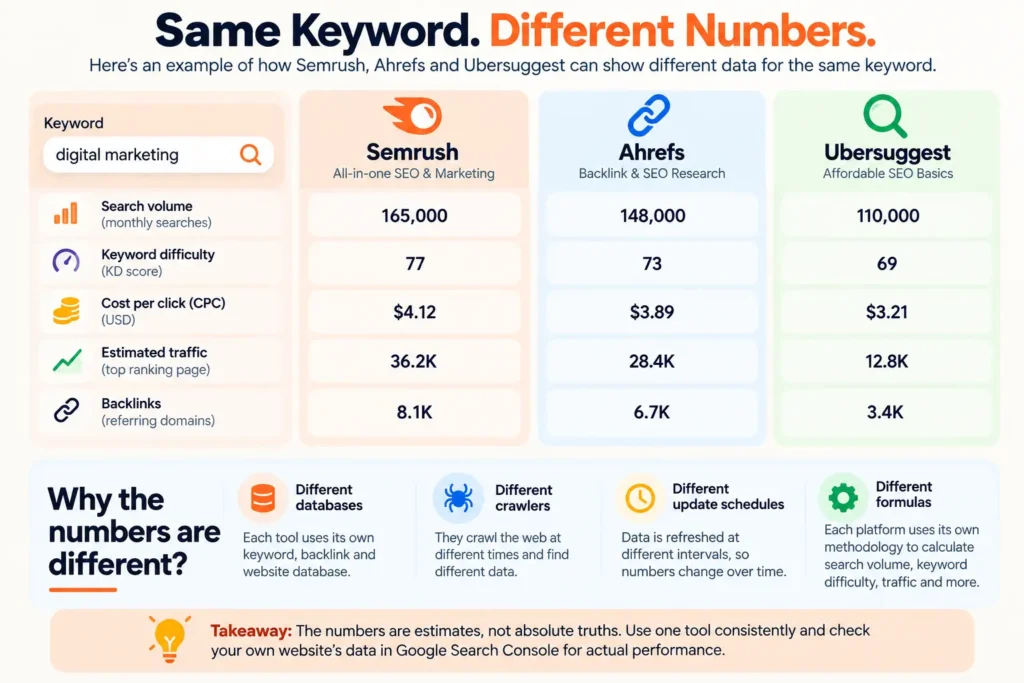
Sooner or later you will look up one keyword in two tools and see two answers. This is normal. It does not mean one tool is broken.
Each platform has its own:
- crawlers and databases of web pages and backlinks
- sources and models for estimating search volume and traffic
- update schedule
- formulas for scores like keyword difficulty
So the same keyword can show different search volume, difficulty, traffic estimates, backlink counts, referring domains, ranking keywords and CPC.
Why does keyword difficulty differ?
Ahrefs says its keyword difficulty is based on how many websites link to the top 10 ranking pages for a keyword. It is a backlink based score. Semrush blends several signals, and reviewers describe it as including authority style factors and SERP characteristics. Ubersuggest uses its own formula. A keyword can look “medium” in one tool and “hard” in another because they weigh different things.
How to use keyword difficulty well:
- Treat it as directional, not a verdict. It helps you sort a long list.
- Pick one tool for difficulty and stay with it. Comparing a score from one tool to a score from another tells you very little.
- Read the actual top 10. If most results are thin pages on small sites, a “hard” score may be overstated. If every result is a giant brand, an “easy” score may be too hopeful.
Why Search Console still matters
For a website you control, Google Search Console and GA4 show real impressions, clicks, queries and conversions. Third party tools can only estimate those. Use the paid tools to explore the market and Search Console to confirm what is happening on your site.
Semrush vs Ahrefs vs Ubersuggest: Which Tool Is Best for Backlink Analysis?
If a competitor ranks above you, can you see why? Backlinks are often part of the answer. The question is whether the tool helps you find links worth pursuing, not whether it shows the biggest number.
Look for:
- referring domains and their authority
- new and lost links over time
- competitor backlink comparison (who links to them but not to you)
- anchor text patterns
- a workflow to find prospects
How they differ:
- Ahrefs: Backlinks are its core strength. Site Explorer shows referring domains, new and lost links, anchors and broken backlinks. Link Intersect (sites that link to competitors but not to you) gives you a ready list of outreach ideas.
- Semrush: Backlink Analytics, Backlink Gap, a Backlink Audit and a link building tool with an outreach workflow. It covers the path from analysis to outreach in one platform.
- Ubersuggest: A lighter backlink view with referring domains, anchors, dofollow and nofollow, plus a backlink opportunities report. Good for a first look, with less depth for serious link campaigns.
Micro verdict: “Ahrefs is best for backlinks” only matters if you do link building every week. If you publish content and rarely do outreach, the gap between the tools matters less than the price gap.
Which tool is best for competitor research?
There are two different questions, and tools often blur them:
- What keywords does my competitor rank for? All three can show this.
- Which of those are realistic opportunities for me? This needs filtering and an honest look at your own site’s strength.
What each gives you:
- Semrush: Domain overview, organic research, Keyword Gap, Backlink Gap, and paid search data in the same place. Useful when you care about SEO and PPC together.
- Ahrefs: Site Explorer for organic keywords, top pages and traffic trends, plus Content Gap for keywords a competitor ranks for and you do not. Paid search data is there too.
- Ubersuggest: Competitor and similar website views with keyword and content gap style reports. One reviewer noted you cannot fully choose which competitors it suggests, so check the list.
Competitor traffic numbers are estimates. Use them to compare sites and spot patterns, not as exact traffic figures.
Which tool is best for technical SEO and site audits?
A site audit is a workflow, not a checklist:
- Crawl the site
- Review the issues found
- Judge how serious each one is
- Prioritize fixes
- Implement
- Recrawl
- Monitor
All three tools include a crawler. They check broken links, redirects, metadata, duplicate content, canonical tags, HTTPS and internal links. The differences are mostly crawl limits, depth of reporting and how clearly issues are explained.
- Semrush: Detailed site audit plus an on page checker. Crawl limits grow by plan (100,000 pages a month on Pro).
- Ahrefs: Strong on site structure and internal linking views. Crawl allowances also vary by plan.
- Ubersuggest: A simpler audit that covers the basics with plain suggestions. Fine for small sites, less suited to large ones.
Finding 100 issues does not mean fixing 100 things today. Fix what affects crawling, indexing and real users first: blocked pages, broken key pages, redirect chains, missing titles on important pages. A warning about a minor tag on a page nobody visits can wait. If you want a human review of your own site, see my free website SEO audit.
Which tool is best for rank tracking?
Rank tracking answers: “Is my work moving the needle after I publish?” All three track keyword positions. Compare:
- location level (country, city, in some tools ZIP level)
- device
- competitor tracking
- history length and update frequency
- the tracked keyword limit on your plan, which is usually the real constraint
Limits again: Semrush Pro 500 keywords, Guru 1,500. Ahrefs Lite about 750, Standard about 2,000. Ubersuggest Individual about 125. Reviewers also report local rank tracking in Ubersuggest at city and ZIP level.
Pair rank data with Search Console. Rankings are a useful signal, but clicks and conversions pay the bills.
Which tool is best for content research?
Tools help you find topics, see what competitors cover, group keywords and spot gaps. They do not tell you what will be genuinely useful to readers.
- Semrush: Topic and content tools, with the stronger content features on Guru, Pro+ and above.
- Ahrefs: Parent topic grouping, content gap, and an optional AI Content Helper add on (reported around $99 a month).
- Ubersuggest: Content ideas and an AI writer. Quick and cheap for idea generation.
AI writing is not an SEO strategy. An AI draft does not give you search visibility, and it is not useful content just because it exists. Let the data shape what you write. The usefulness of the page still depends on you. For a practical guide, read how to write content that AI search engines can understand, or see my SEO content writing services.
Which tool is best for local SEO?
Do not assume the three tools match here. They do not.
- Semrush: Has a dedicated Local toolkit, listed from about $30 per location a month, focused on listings and local tracking.
- Ubersuggest: Reviewers report local rank tracking at country, city and ZIP level. It does not position itself as a listings management tool.
- Ahrefs: Its strength is general organic and link data. I could not verify a dedicated citation or listing management product, so plan to pair it with Google Business Profile and other tools.
If local is your main work, confirm which local features sit inside the exact plan you are buying. For the strategy side, see local SEO services in Delhi.
What do these tools offer for AI search visibility and GEO in 2026?
This is where marketing language gets loose, so separate five things:
- AI content generation: a tool writes text for you.
- AI assisted SEO: AI helps with tasks like grouping keywords or suggesting titles.
- AI search visibility tracking: measuring whether your brand or pages are mentioned or cited in AI answers from tools like ChatGPT, Gemini, Perplexity or Google’s AI features.
- GEO (generative engine optimization): the work of making your content easier for AI answer tools to understand and cite.
- Traditional Google SEO: ranking in standard results.
Google’s documentation on AI features and your website says there are no extra requirements to appear in AI Overviews or AI Mode and no special optimizations needed. Normal SEO fundamentals still apply, and sites in those features are counted in normal Search traffic in Search Console. So no tool can honestly promise to “rank you in AI Overviews” with a secret method.
What the three tools offer today:
- Semrush: AI visibility tracking is bundled into the Semrush One plans, with plan based prompt allowances (reported as 50, 100 and 200 tracked prompts on Starter, Pro+ and Advanced). On Classic plans it is a separate paid toolkit.
- Ahrefs: Brand Radar tracks brand visibility across AI answers and is sold as an add on on top of your base plan. Sources disagree on exact platform coverage and price, so check the Ahrefs page for the current list.
- Ubersuggest: Launched AI Search Visibility in February 2026 with reports on brand visibility, competitors and sentiment. Early reviews said it covered ChatGPT and Gemini. Check the current platform list.
Be careful with what these numbers mean. AI answers change from one run to the next. These tools show sampled snapshots, not guaranteed rankings. Treat them as directional. If you want to understand why AI tools mention one brand and not another, read why ChatGPT cites your competitor, not you.
Which tool is easiest to use?
“Ubersuggest is easiest” is true, but the reason matters.
- Ubersuggest: Fewer metrics per screen and a short path from keyword to idea. The tradeoff is less depth when your questions get complex.
- Ahrefs: Clean layout with clear navigation, but a lot of data once you go deeper. Beginners need time to learn which numbers matter.
- Semrush: Many toolkits and filters, so the menu can feel crowded. Great if you like everything in one account, heavy if you want one answer fast.
More data often means more complexity. Less complexity often means fewer capabilities. Choose based on how much depth your work needs, not on which screen looks nicest.
Which tool is best for agencies and client work?
Compare these:
- number of projects and sites
- seats and the cost of extra users
- reporting options
- competitor monitoring across clients
- tracked keyword limits per plan
At a glance:
- Semrush: Built with agency workflows in mind, including reporting. Cost rises quickly with seats, and API access is reported as Business only.
- Ahrefs: Standard (20 projects) and Advanced (50 projects) suit small to mid agencies. Extra seats cost less than Semrush at the same tier.
- Ubersuggest: Business and Enterprise plans cover several domains at a low price. Good for a solo freelancer with a few small clients, less suited to heavy reporting.
Semrush: where it shines and where it doesn’t
- Does well: Combining SEO, paid search, content and local data in one account. Wide filters in keyword research. Gap analysis for both keywords and backlinks. AI visibility bundled into the One plans.
- Falls short: Higher entry price, a busy interface, and seat costs that grow fast. Many valuable features sit in higher tiers or add ons.
- Choose it if: You do SEO and paid together, manage several projects, or want one broad platform.
- Probably skip it if: You need basic keyword research for one site, or your budget is under about $50 a month.
Ahrefs: where it shines and where it doesn’t
- Does well: Backlink research, competitor organic research, traffic potential and parent topic grouping, and clear data in Site Explorer. It is not only a link tool: its keyword and content gap workflows are strong too.
- Falls short: The entry plan is limited, Lite can feel restricted by credits, and AI tracking is a pricey add on.
- Choose it if: Link building or competitor organic research is a regular part of your week.
- Probably skip it if: You mainly need local SEO or all in one marketing reports, or you only do light keyword research.
Ubersuggest: where it shines and where it doesn’t
The harder question is: when is a cheaper tool enough?
- Does well: Low price, a simple interface, quick keyword and content ideas, a site audit, rank tracking, and (when available) a lifetime option.
- Falls short: Less depth in backlink data, fewer advanced filters, and tighter limits on domains and tracked keywords.
- Choose it if: You are a beginner, blogger, solo freelancer or small business with one to a few sites.
- Probably skip it if: You run heavy link building, manage many client sites, or need the deepest competitor data.
Do you need both Ahrefs and Semrush?
For most people, no. Both cover keyword research, competitor research, backlinks, rank tracking and audits. The overlap is large. Two subscriptions mostly mean paying twice for similar data and comparing numbers that were never meant to match.
Two subscriptions can make sense when:
- you are a link building specialist who wants Ahrefs for links and Semrush for another dataset or for PPC
- an agency has team members who prefer different workflows
- a client or process needs a cross check on key numbers
Otherwise, spend the second subscription’s money on better content, a freelancer, or fixing technical issues.
When is Ubersuggest enough?
It is often enough if you need:
- basic keyword research and content ideas
- a simple competitor view
- a simple site audit and rank tracking for a small site
- a low cost start
Think about moving up when:
- you track more keywords or sites than your plan allows
- link building becomes a real campaign
- you need deeper filters or larger exports
- you need agency reporting or many projects
What can SEO tools not tell you?
SEO tools give data and estimates. They do not make the strategy for you. They cannot tell you:
- your real conversions or revenue (use GA4 and your CRM)
- the quality of the customers a keyword brings
- exact competitor traffic
- whether a visitor will buy
- whether a backlink will bring any business
- whether a high volume keyword will really send clicks
- whether the keyword fits what your business sells
- whether your page satisfies the searcher better than the pages already ranking
That last one matters most. A tool can say a keyword looks winnable. Only reading the results and writing a better page shows whether you can win it.
Which tool does each SEO task better?
| SEO task | Semrush | Ahrefs | Ubersuggest | Best fit (conditional) |
|---|---|---|---|---|
| Keyword discovery | Wide filters, intent, CPC | Parent topic, traffic potential | Simple ideas and questions | Semrush or Ahrefs for depth, Ubersuggest for speed |
| Keyword difficulty | Blended score | Backlink based, method published | Own formula | Whichever you use consistently |
| Competitor research | Strong, includes paid | Strong, organic focused | Basic to good | Semrush or Ahrefs |
| Backlink research | Strong, with outreach | Core strength | Lighter | Ahrefs, Semrush close |
| Content research | Strong on higher tiers | Good, content gap | Ideas and AI writer | Depends on plan and budget |
| Site audit | Detailed | Strong structure views | Basic | Semrush or Ahrefs for large sites |
| Rank tracking | Good, limits by plan | Good, limits by plan | Good for small sites, city and ZIP | Depends on keywords needed |
| Local SEO | Dedicated toolkit | Not a focus | Local rank tracking | Semrush if you need listings work |
| PPC research | Strongest of the three | Paid keywords and ads data | Limited | Semrush |
| AI visibility | Bundled in One plans | Paid add on | Built in, newer | Semrush One for bundled, Ubersuggest for lower cost |
| Agency reporting | Built for it | Good | Limited | Semrush or Ahrefs Standard and up |
| Beginner workflow | More to learn | More to learn | Simplest | Ubersuggest |
This table compares product information and reviews, not lab results. Use it to decide what to check in a trial.
Who should choose which tool?
| You are… | Likely fit | Reason |
|---|---|---|
| Complete beginner | Ubersuggest | Lower cost and a simpler interface while you learn |
| Blogger or content creator | Ubersuggest, or Ahrefs/Semrush if content earns your income | Cheap ideas first, deeper tools when traffic pays for them |
| Freelancer | Ubersuggest Business, or Ahrefs/Semrush if client work needs depth | Match project count to number of clients |
| Small or local business | Ubersuggest, or Semrush if local listings matter | Check local features first |
| SEO specialist | Ahrefs or Semrush | Depth and filters matter |
| Link builder | Ahrefs | Link research is the core job |
| Ecommerce | Semrush or Ahrefs | Larger keyword sets and competitor data |
| Digital marketer (SEO plus ads) | Semrush | Paid and organic data together |
| Agency | Semrush or Ahrefs Standard and above | Projects, seats and reporting |
| Enterprise SEO | Semrush or Ahrefs enterprise plans | Custom limits and API |
Not every row has a different answer, because the evidence does not support one. Several types of users land on the same tool for the same reason.
How can you test the tools yourself?
I have no test data to show you, so here are two quick tests you can run during free or trial periods.
Same keyword, three tools
- Pick one keyword you care about. Keep the same country, language and date for all three tools.
- Record volume, difficulty, CPC and the related keywords each tool suggests.
- Compare the top 10 results the tool shows with a manual Google search.
- Write down the gap between the numbers, not just the numbers.
- Ask: which tool helped me decide faster whether to write this page?
Same competitor, three tools
- Pick one competitor domain.
- Record estimated organic traffic, ranking keywords, top pages, backlinks, referring domains and keyword gaps.
- Expect the numbers to differ.
- Check which tool found the most useful gaps for you, not the biggest total.
Your own Search Console data is the check for your own site.
How do you judge value for money?
Value = useful data + useful limits + workflow speed + features you will really use, compared with price.
That is why one tool can be great value for one person and wasteful for another. A $29 plan is expensive if it can’t track what you need. A $249 plan is cheap for an agency running six clients on it.
How should you choose? A simple framework
- I do a lot of link building: Try Ahrefs first and test how fast you can build a prospect list.
- I run SEO and paid ads: Try Semrush and check paid and organic views together.
- I have a small budget and one site: Try Ubersuggest and compare its limits with your real needs.
- I run many projects: Compare project, seat, tracking and reporting limits, then price.
- Local SEO is my focus: Check which local features are in your exact plan.
- Content is my main job: Test the keyword and content research workflow on your own topics.
Final verdict: which SEO tool should you pick?
- Broad SEO and marketing workflows: Semrush, if you will use its range.
- Deep SEO and link research: Ahrefs.
- Lower cost SEO: Ubersuggest.
- Beginners: Ubersuggest, with Search Console alongside it.
- Agencies: Semrush or Ahrefs Standard and above, chosen by workflow and limits.
- AI search visibility: Semrush One bundles it. Ahrefs sells it as an add on. Ubersuggest includes a newer version at a lower cost. All three are directional.
If I were starting today: I would set up Google Search Console first (it is free), then try Ubersuggest or a free trial of the tool that matches my main job. I would upgrade only when I hit a real limit, not when a feature list looks exciting. Choose the tool because its data helps you decide better, not because its number looks bigger.
If you would rather have someone use these tools for you, see my SEO services or work with me as a freelance SEO. You can also book a free 30 minute call.
Frequently asked questions
Which SEO tool is better: Semrush, Ahrefs or Ubersuggest?
It depends on the job. Ahrefs is the usual pick for link research, Semrush for broad SEO plus paid work and AI tracking, and Ubersuggest for lower cost basics.
Which is better, Semrush or Ahrefs?
They overlap heavily. Choose Ahrefs if backlinks and organic research lead your week. Choose Semrush if you want SEO, ads and content tools in one place.
Is Ubersuggest good for SEO?
Yes, for basics: keyword ideas, a simple audit, rank tracking and content ideas, especially on a small site.
Is Ubersuggest enough for a small business?
Often, yes, if you run one to a few sites. Move up if you need heavy link building, many projects or deeper data.
What is the most affordable SEO tool?
Of these three, Ubersuggest at $29 a month, with a lifetime option when offered. Ahrefs Starter is also $29 but is limited.
Which keyword research tool is most accurate?
No tool is proven most accurate for every keyword. Their data comes from different sources and formulas. Use one tool consistently and check your own site in Google Search Console.
Do I need both Semrush and Ahrefs?
Usually no. Most people are fine with one. Two subscriptions suit link building specialists and some agencies.
Can Ubersuggest replace Semrush or Ahrefs?
For basic work, yes. For deep backlink research, many projects or agency reporting, it will feel limited.
Which SEO tool is best for agencies?
Semrush or Ahrefs Standard and above, depending on whether you value reporting breadth or link research.
Can these tools get me into ChatGPT or Google AI Overviews?
No tool can promise that. They can track visibility and show gaps. Google says there are no special requirements for AI Overviews beyond normal SEO.
About the author: Leena Kalyana is a Delhi based freelance digital marketer who works on SEO, content and social media for businesses. This guide is based on current plan information and published documentation, not on a controlled test of each tool.

I’m Leena Kalyana, a Delhi-based freelance digital marketer and graphic designer. I work across SEO, content marketing, social media, and digital design. I’m interested in helping businesses build a stronger online presence through practical SEO strategies, useful content, and creative digital marketing.