


LEEGROWTH / SEO FIELD GUIDE
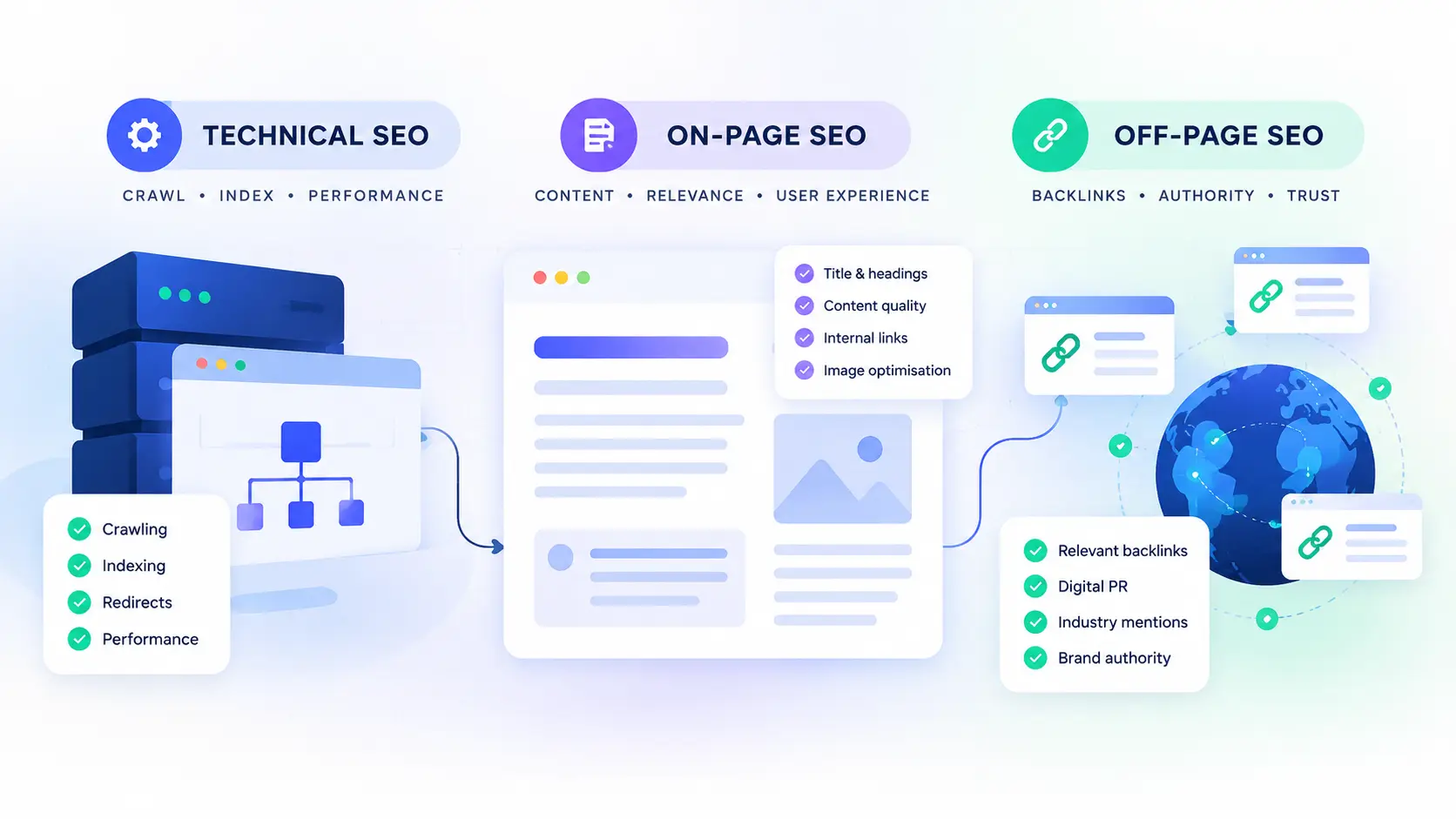
Technical SEO vs on-page SEO comes down to two questions: can Google access and process your page, and does that page answer what people are searching for? Off-page SEO adds a third consideration: how your website earns recognition beyond its own pages.
A page can have a well-written title and still stay out of Google’s index. Another can be indexed, load quickly, and attract almost no relevant traffic. A third can contain useful information but struggle to earn recognition from other websites.
The right fix depends on the problem, not on which SEO discipline sounds more important.
The short answer: Technical SEO deals with crawling, indexing and website infrastructure. On-page SEO improves the relevance and usefulness of individual pages. Off-page SEO covers reputation and recognition beyond your site, including relevant editorial backlinks. None guarantees rankings on its own.
Technical SEO vs On-Page SEO: What’s the Difference?
Think about a small business publishing a new service page. Search engines need to discover and process the URL. The page needs to answer the customer’s question. The business also needs to build credibility in its market.
Those jobs overlap, but they aren’t interchangeable.
| SEO discipline | Main purpose | Typical work | First question |
|---|---|---|---|
| Technical SEO | Make important pages accessible and technically sound | Crawling, indexing, redirects, canonicalization and performance | Can Google access and process this URL as intended? |
| On-page SEO | Help pages satisfy search intent and communicate their topic | Content, titles, headings, internal links and image descriptions | Does this page answer the searcher’s question? |
| Off-page SEO | Build reputation and relevant recognition outside your site | Editorial backlinks, digital PR and relevant industry mentions | Why would relevant websites reference this resource? |
When deciding between technical SEO vs on-page SEO, start with evidence. Check whether Google can access and index the page before assuming the content needs a rewrite. If the page is accessible but doesn’t satisfy the query, focus on its content and search intent.
What Does Technical SEO Look Like When Something Goes Wrong?
Technical SEO becomes useful when you connect a website problem to a specific cause. A list of warnings from an audit tool isn’t a diagnosis by itself.
An important page isn’t appearing in Google
Inspect the exact URL in Google Search Console. Check the reported indexing status, crawl information, canonical selection and any restrictions. Compare those findings with the page’s actual response and configuration.
A page blocked by an unintended noindex directive needs a different fix from a page Google can crawl but hasn’t chosen to index. Removing a restriction doesn’t guarantee indexing, and requesting indexing doesn’t force Google to include the page.
Google is choosing a different URL
Duplicate or similar pages, tracking parameters, redirects and inconsistent internal links can send conflicting URL signals. Check the canonical annotation, Google’s selected canonical, sitemap entries and internal links together.
Google treats canonical annotations as signals rather than binding commands. See Google’s canonicalization documentation.
The website is slow or unstable
Use PageSpeed Insights to investigate representative pages. Look at the actual diagnostics: oversized images, expensive scripts, slow responses or layout shifts can require different fixes.
Core Web Vitals measure loading performance, responsiveness and visual stability. A perfect score does not guarantee a ranking increase. Fix problems that affect users rather than chasing a number in isolation.
🔵 Quick tip: Technical SEO
Before rewriting an underperforming page, inspect its URL in Search Console. Confirm its indexing status and canonical selection first.
🟣 Quick tip: On-page SEO
Search the target query and study the results. If searchers want a comparison, a general introductory article probably won’t satisfy their intent.
🟢 Quick tip: Off-page SEO
Evaluate backlinks by relevance, editorial context and credibility. Don’t judge a campaign by the number of links acquired alone.
🔵 Quick tip: Prioritization
A title change won’t fix an indexing restriction. Buying links won’t make an irrelevant page useful. Fix the problem your evidence identifies.
What Does On-Page SEO Look Like When Something Goes Wrong?
A technically accessible page can still be a poor answer to a search query. That’s where on-page SEO comes in.
The page answers a different question from the one people are asking
Someone searching for technical SEO vs on-page SEO expects a comparison, examples and guidance about which area to address first. An article that delays the answer behind a long introduction about the importance of SEO misses the immediate need.
Study the current search results, identify the dominant intent and make sure the page answers the actual question. Finding a keyword with low difficulty doesn’t make a weak article competitive.
The title promises more than the page delivers
A title tag should describe the page accurately. If it promises a troubleshooting guide but the article contains only definitions, changing the wording alone won’t fix the mismatch.
Review the title, H1, opening section and actual content together. Use headings to help readers find information. Add examples when they clarify a decision, not simply to make the article longer.
The page gets impressions but few clicks
Don’t immediately rewrite the title. Open the Search Console performance report and review the queries generating impressions, average position and the context of those searches.
A page appearing for irrelevant queries has a different problem from a page ranking well for its intended query but attracting few clicks. Search intent, competing results and SERP features matter too.
Internal links and images need a purpose
Internal links help visitors find related resources and help search engines discover other pages. Use descriptive anchor text and link to genuinely relevant destinations.
Images should clarify a process or demonstrate a point. Give informative images meaningful alternative text and optimize their dimensions and file sizes.
Off-Page SEO: What Happens Beyond Your Website?
Off-page SEO covers activities and signals beyond the pages you control. Backlinks are a major part of this work, but the aim isn’t to collect as many links as possible.
Relevant backlinks beat meaningless link counts
A useful link-building strategy starts by identifying resources that deserve a reference. That might be an original guide, a useful tool, research or an expert contribution that helps a publisher’s audience.
Look for relevant publications and industry resources where your material would add value. A link from an unrelated page isn’t automatically valuable simply because a tool reports a strong authority metric.
Outreach needs a reason
Before contacting a publisher, identify the specific resource that would benefit their audience. Explain its relevance clearly. Generic messages asking for a backlink give the recipient little reason to respond.
Be cautious with paid-link schemes intended to manipulate rankings. Google’s spam policies describe link spam practices that violate its guidelines.
When Should You Prioritize Technical SEO vs On-Page SEO?
The right choice in technical SEO vs on-page SEO depends on what is holding the page back. An indexing restriction calls for technical investigation, while weak relevance calls for an on-page review. Off-page SEO becomes a separate consideration when assessing your website’s reputation and relevant external links.
What Should You Fix First? Diagnose the Actual Problem
Choose the symptom that best matches what you’re seeing. The first check is a starting point, not proof of the cause.
What’s happening on your website?
Start with technical SEO.
Inspect the exact URL in Search Console. Check indexing status, crawling restrictions, noindex directives and canonical selection. If no technical blocker explains the issue, investigate discovery, duplication and content quality.
Investigate search performance.
Review queries, average position, search intent, SERP features and title relevance. Low click-through rates alone don’t prove that the title is the problem.
Start with on-page SEO.
Compare the page with the intended query. Check whether its content, title and format match what searchers expect. Verify that the page is accessible and indexed as intended.
Investigate off-page SEO.
Review relevant referring domains, existing links and competitor opportunities. Look for credible editorial opportunities instead of buying links to increase a metric.
Start with performance diagnostics.
Test representative URLs in PageSpeed Insights. Identify the actual bottleneck before changing images, scripts or templates.
A Practical Order of Operations
01 / Check access
Confirm that important pages return the expected status and aren’t accidentally excluded from indexing.
02 / Check relevance
Review queries, search intent and content. Make sure the page answers the question it is intended to rank for.
03 / Check reputation
Assess whether relevant external references and credible editorial links are missing from your broader SEO strategy.
04 / Verify the result
Record the problem, evidence, change and verification method. Check the appropriate Search Console, crawler or performance data after implementation.
This is a starting sequence, not a rule that all technical work must finish before content or link building begins. Prioritize tasks by evidence, business impact and effort.
Common Mistakes That Waste SEO Effort
- Changing robots.txt without checking affected URLs. A broad rule can block pages you intended to make discoverable.
- Adding keywords without examining intent. More mentions won’t turn the wrong page format into the right answer.
- Building links indiscriminately. Decide which resources genuinely deserve references and why.
- Treating every audit warning as urgent. Prioritize real issues affecting important URLs instead of chasing a perfect tool score.
- Changing several things at once without recording them. Keep track of what changed so you can interpret the outcome.
Frequently Asked Questions
Is technical SEO more important than on-page SEO?
Neither is universally more important. An important page accidentally blocked from indexing needs a technical fix. An accessible page that fails to satisfy search intent needs content work.
Is off-page SEO just link building?
No. Link building is a major component, but off-page SEO also includes broader reputation-building activities such as digital PR and relevant industry mentions. Not every mention creates a backlink or directly improves rankings.
Can good content rank without backlinks?
Pages can rank without deliberately acquiring backlinks. The outcome depends on the query, competition, content, accessibility and other signals. No universal backlink count guarantees a position.
Which SEO tools should a small business use first?
Start with Google Search Console for indexing and search performance, and PageSpeed Insights for performance diagnostics. Add a crawler when you need to inspect URLs, internal links or directives across a larger site. For free and paid options, see our guide to the best SEO tools for small businesses in India.
What to Do Next
Don’t begin by trying to improve every SEO metric. Pick an important page, identify the problem you can observe, and verify the cause before changing anything.
The practical difference between technical SEO vs on-page SEO is the problem each discipline solves. Diagnose the issue, make the appropriate change, and verify the result before moving on.
If you’d like an expert to review your website, request a free website SEO audit.
LEEGROWTH / SEO SERVICES
Find out what’s holding your website back.
Get a clear review of technical issues and page-level SEO opportunities, with practical next steps based on your website’s needs.

I’m Leena Kalyana, a Delhi-based freelance digital marketer and graphic designer. I work across SEO, content marketing, social media, and digital design. I’m interested in helping businesses build a stronger online presence through practical SEO strategies, useful content, and creative digital marketing.