


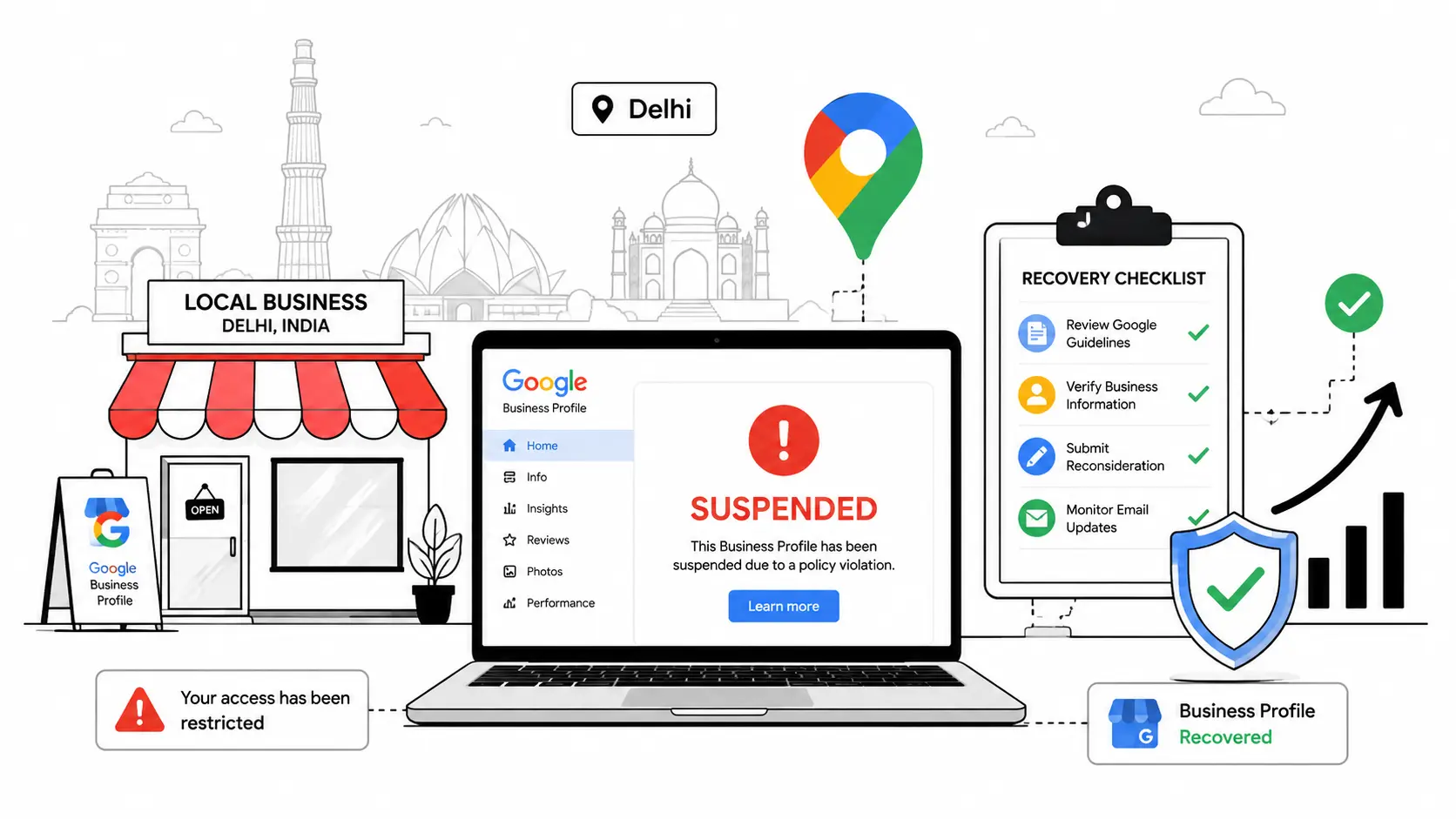
Is your Google Business Profile suspended in Delhi? If so, you’re probably watching your phone go quiet right now — no calls, no walk-ins, no “how did you find us?”
That’s the real cost of a suspension. It’s not the warning message itself — it’s the customers who can no longer find you on Google Maps.
The good news: most cases of a Google Business Profile suspended in Delhi are fixable, usually within one to three weeks, once you know exactly what Google is checking for.
This guide covers:
- Why Google suspends profiles in Delhi specifically
- How to tell a soft suspension from a hard suspension
- The exact documents that work for Indian businesses
- A step-by-step reinstatement process, including video verification
- A free, ready-to-use appeal letter template
- What to do if Google rejects your first appeal
- Whether to fix it yourself or hire a Google Business Profile expert in Delhi
Let’s fix this.
What a Google Business Profile suspended in Delhi Actually Means
A suspended Google Business Profile means Google has removed your ability to manage your listing — and in serious cases, removed it from Maps and Search entirely.
In simple words: Google’s automated systems (or sometimes a human reviewer) flagged something on your profile as a possible policy violation and locked you out until it’s reviewed.
This is different from:
- A disabled profile — a more serious, longer-lasting action
- A listing that simply isn’t ranking well — that’s a visibility problem, not a suspension
Your dashboard usually labels the status clearly, so check there first.
Suspended vs. Disabled: What’s the Difference in Delhi?
- Suspended: usually recoverable through the standard reinstatement process.
- Disabled: removed for a more serious or repeated violation. Recovery is harder, though not impossible.
If your dashboard says “disabled” rather than “suspended,” treat it as more urgent and gather stronger documentation before you appeal.
Google Business Profile Suspended in Delhi After Verification
A common pattern in Delhi: a business completes verification successfully, then gets suspended days or weeks later.
This usually means the initial verification passed, but a later automated quality review flagged something — often a name, address, or category inconsistency that existed all along but wasn’t caught the first time. Diagnose the type of suspension, then work through the checklist below.
Soft Suspension vs. Hard Suspension: Know the Difference First
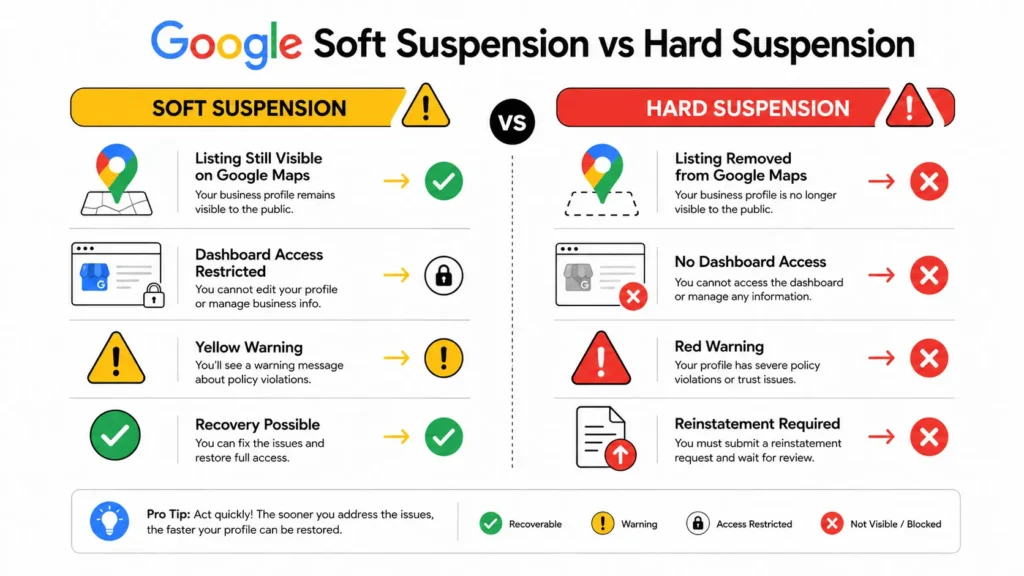
Before you do anything else, find out which type you’re dealing with. Fixing the wrong one wastes days you don’t have.
| Soft Suspension | Hard Suspension | |
| Visible on Google Maps? | Yes | No — completely removed |
| Can customers still call you? | Yes | No |
| Dashboard access | Locked, but profile visible | Shows “Suspended” |
| How to fix it | “Request Review” button inside GBP | Business Redressal / Reinstatement Form |
| Typical recovery time | 3–10 business days | 7–21 business days |
How to Check Which One You Have
Search your business name on Google Maps:
- Still shows up, but the dashboard says “suspended”? That’s a soft suspension.
- Gone completely from Maps and Search? That’s a hard suspension.
Don’t create a new listing while your current one is suspended, under any circumstance. Google treats this as an attempt to bypass review, and it often results in both listings being suspended permanently.
Why Do Google Business Profiles Get Suspended in Delhi?
Delhi has one of the highest Google Business Profile suspension rates in India — and it isn’t random. Here’s why:
1. Shared and Virtual Office Addresses
- Cause: Delhi NCR has one of the highest concentrations of coworking spaces in the country. If your GBP address is a coworking hub shared with dozens of other businesses, Google’s spam-detection systems flag it quickly.
- Fix: If you don’t have a genuine, dedicated storefront, set your profile up as a Service Area Business (SAB) and hide your public address. This is fully compliant with Google’s guidelines and avoids this entire category of suspension.
2. High-Density Commercial Markets
- Cause: Areas like Nehru Place, Karol Bagh, Chandni Chowk, Lajpat Nagar, and Connaught Place pack hundreds of shops into a few buildings. When many businesses share a building, floor, or similar shop-number formatting, Google’s duplicate-detection systems often misfire — flagging real listings as duplicates or fakes.
- Fix: If your shop is in one of these markets, this is very likely part of the problem.
3. Keyword Stuffing in the Business Name
- Cause: Listing your business as “Best Dental Clinic Karol Bagh — Braces Implants Whitening” instead of its real registered name is a direct guideline violation.
- Fix: This is one of the most common triggers for both automated and manual suspension. Use your real, registered business name only.
4. Address or NAP Mismatch
- Cause: Your GBP address must match your GST certificate, website, and other directories such as Justdial, Sulekha, and IndiaMART exactly — same floor number, same building name, same pin code.
- Fix: Even small formatting mismatches, like “Plot 14” versus “Plot 14A,” can trigger a flag. Check every source character-for-character.
5. Changing Your Business Address
- Cause: Moving locations without updating your GST registration, website, and directory listings at the same time creates an inconsistency Google can flag as a quality issue.
- Fix: If you’ve recently moved, update every citation source within the same week — not gradually over months.
6. Changing Your Business Name
- Cause: Repeated name edits — especially ones that add keywords, locations, or promotional phrases — are one of the fastest ways to trigger a suspension.
- Fix: Google treats frequent, inconsistent name changes as a manipulation signal. Keep your name stable and identical to your GST certificate.
7. Duplicate Listings
- Cause: Common when a previous owner, employee, or agency created a second listing that was never merged or removed.
- Fix: Google typically suspends one or both listings when it detects two for the same business at the same location. Merge or remove the extra listing.
8. Fake or Incentivized Reviews
- Cause: Asking staff or customers for reviews in exchange for discounts, or running a sudden “leave us a review” campaign, creates an unnatural review spike.
- Fix: Google’s systems are specifically tuned to detect this kind of velocity anomaly. Grow reviews steadily instead.
9. Wrong or Misleading Business Category
- Cause: Choosing a broader category to appear in more searches — a CA firm listing itself as “Financial Consultant,” for example — creates a category-mismatch signal.
- Fix: Pick the category that most accurately describes what your business actually does.
Can a Home-Based Business in Delhi Have a Google Business Profile?
Yes, but with conditions.
- Google allows home-based and service-area businesses to have a profile without displaying a public address.
- If you run your business from home, set your profile up as a Service Area Business and hide the address, rather than listing your home address publicly.
- This is one of the most common gaps that leads to suspension for small and solo-run businesses in Delhi.
What Documents Work for a Google Business Profile suspended in Delhi
Most rejected appeals aren’t rejected because the business is illegitimate — they’re rejected because the wrong documents were submitted.
| Document | Why It Works |
| GST Registration Certificate | The single most effective document for Indian businesses. Make sure the address matches your GBP listing exactly, including floor number. |
| Delhi Shop & Establishment License (MCD/NDMC) | Strong, municipal-issued proof of a genuine physical presence in Delhi. |
| Electricity or Water Bill | Should be in the business name, at the listed address, dated within the last 3 months. |
| Rent / Lease Agreement | Best used alongside your GST certificate, not alone. |
| Udyam (MSME) Registration | Well-recognized supplementary proof of a legitimate, registered business. |
| Bank Statement Header | Supporting document only — not sufficient on its own. |
| Professional Registration (MCI, ICAI, Bar Council) | Required for regulated professions such as doctors, chartered accountants, and lawyers — always include if applicable. |
Do not submit Aadhaar or PAN card as address proof. These are personal identity documents, not business documents, and Google frequently rejects appeals that rely on them.
Pro Tip
Match every address detail character-for-character across all documents before you submit anything. If there’s a mismatch, fix your GBP listing first — then appeal.
You can check your GST details against the official GST portal, and confirm your Shop & Establishment License status on the MCD website before you submit anything.
Step-by-Step: How to Recover a Google Business Profile suspended in Delhi
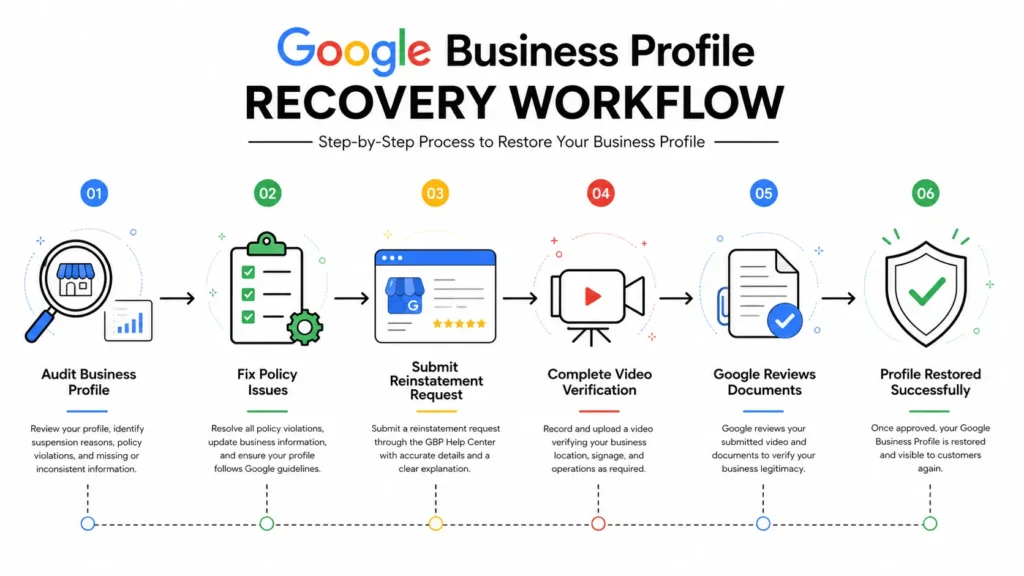
Step 1: Audit Your Profile Before Touching Anything
Go through this checklist first:
- Business name matches your GST certificate exactly (no keywords added)
- Address matches your official documents character-for-character
- Category accurately reflects what your business actually does
- No duplicate listings exist for the same location
- Website is live and shows the same business name and address
- No obvious fake or bulk reviews on the profile
Step 2: Identify the Right Appeal Pathway
- Soft suspension: use the “Request Review” button inside your Business Profile dashboard.
- Hard suspension: use Google’s Business Redressal / Reinstatement Form — search “Google Business Profile reinstatement form” for the current official link, since it changes periodically.
Step 3: Complete Video Verification, If Requested
Google increasingly requires video verification for Indian listings, especially after a suspension. This is one of the most common reasons appeals get stuck. See Google’s own video verification guidance before you film.
Quick checklist for filming it:
- Film during daylight hours with good lighting
- Clearly show your shop’s exterior signage matching your GBP name
- Walk through the interior slowly — don’t rush the recording
- Show any business documents or licenses displayed on-site, if applicable
- Submit within 24 hours of the request — delays can reset your place in the review queue
Step 4: Write a Strong Appeal Statement
Don’t write one line. Google’s reviewers respond better to a clear, factual explanation. Use this structure:
Free Appeal Template
Our business, [Business Name], is a [type of business] serving customers in [Delhi neighborhood] since [year]. We operate from [brief description of location — e.g., “a ground-floor retail unit at (address)”].
We are GST-registered under [GSTIN], and our registered address matches our Google Business Profile listing exactly.
We believe the suspension may have been triggered by [state the likely cause factually — e.g., “an address formatting inconsistency between our GST certificate and our listing”]. We have since corrected this by [what you fixed].
We would appreciate a review of our profile and are happy to provide any additional documentation Google requires.
Customize the bracketed sections. Keep it factual, not defensive.
Step 5: Submit and Wait
| Suspension Type | Typical Timeline |
| Soft suspension | 3–10 business days |
| Hard suspension (first appeal) | 7–21 business days |
| Hard suspension (after rejection) | Wait 7–10 days before re-appealing |
| Video verification requested | Complete within 24 hours |
Will I Lose My Reviews If My Profile Is Suspended?
This is one of the most common — and least answered — questions business owners have.
- Reviews: usually preserved and reappear once reinstated.
- Photos and posts: typically retained, though a hard suspension that requires rebuilding the listing can occasionally reset some data.
- Insights and analytics history: may show a gap for the suspended period but generally resumes once restored.
There’s no absolute guarantee here — Google doesn’t publish a formal policy on this — but most Delhi businesses report their reviews and photos returning intact after reinstatement.
If Your Appeal Gets Rejected: What to Do Next
One rejection isn’t the end. But resubmitting the same appeal changes nothing.
- Read the rejection email carefully — it usually hints at the specific issue.
- Fix the actual problem instead of just resubmitting the same documents.
- Wait at least 7–10 days before appealing again.
- Escalate if you’re stuck after two rejections.
How Many Times Can I Appeal a Suspension?
There’s no official limit, but submitting appeal after appeal without changing anything can actually slow you down — it creates duplicate review cases internally. Space appeals out, and make sure each one includes new information or corrected documentation.
How Do I Contact Google Business Profile Support in Delhi?
Google doesn’t offer a dedicated Delhi or India phone line for individual suspension cases. Your two main channels are:
- The Google Business Profile Help Community, where Google’s Product Experts occasionally escalate stuck cases manually.
- X/Twitter (@GoogleMyBiz), which can help surface unresolved cases publicly.
Never use a different Google account to submit a new appeal. Google tracks this, and it can complicate ownership verification further.
What Happens If a Google Business Profile Profile Is Permanently Suspended in Delhi?
Permanent suspension is rare and usually reserved for repeated policy violations, fraudulent business claims, or businesses that don’t genuinely exist at the listed address.
If you’ve been told your suspension is permanent:
- Double-check the email — many businesses assume “permanent” when it’s actually a standard hard suspension that’s still appealable.
- If it is genuinely permanent, you generally cannot create a new listing for the same business at the same address without risking further action.
- In this situation, professional help is usually worth it — an experienced GBP consultant can assess whether there’s a legitimate path back.
Should You Recover It Yourself, or Hire a Google Business Profile Expert in Delhi?
Both are valid — it depends on your situation.
| Do It Yourself | Hire an Expert | |
| Best for | Soft suspensions, simple NAP fixes | Hard suspensions, repeat rejections, video verification issues |
| Cost | Free (your time only) | Paid, but usually faster resolution in complex cases |
| Time investment | A few hours to research and wait | Minimal — an expert handles documentation and appeals |
| Risk of a wrong appeal | Higher if you’re unfamiliar with the process | Lower — experienced with what Google actually accepts |
If your suspension is a soft suspension with a clear, single cause — like a name keyword issue — you can likely fix it yourself using this guide. If you’re on your second rejected appeal, or dealing with a hard suspension tied to address verification, professional help usually pays for itself in recovered business days.
How to Prevent Future Google Business Profile Suspensions in Delhi
Once you’re reinstated, protect your profile with these habits:
- Keep your business name exactly matching your GST certificate — no keywords, no locations added
- Maintain identical NAP (Name, Address, Phone) across Justdial, Sulekha, IndiaMART, your website, and social profiles
- If you work from home or a shared office, switch to Service Area Business mode
- Grow reviews steadily — a sudden spike looks suspicious to Google’s systems
- Respond to every review, especially negative ones
- Post updates on your profile at least twice a month
- Check weekly for unauthorized “suggested edits” — Google allows anyone to propose changes to your listing
Pairing this with steady local SEO work makes future suspensions far less likely, since a well-documented, consistent profile is exactly what Google’s systems trust.
Frequently Asked Questions
Why Is My Google Business Profile suspended in Delhi?
Usually one of a few common causes: a keyword-stuffed business name, an address that doesn’t match your official documents, duplicate listings, fake or incentivized reviews, or a mismatched business category. In Delhi specifically, shared coworking addresses and high-density commercial markets are frequent triggers.
How Long Does Reinstatement Take in Delhi?
Soft suspensions typically resolve in 3–10 business days. Hard suspensions usually take 7–21 business days, and complex or repeat-appeal cases can take four to six weeks.
Can I Create a New GBP Listing While My Old One Is Suspended?
No. Google treats this as an attempt to bypass the suspension, and it usually results in both listings being suspended.
What’s the Difference Between a Soft Suspension and a Hard Suspension?
A soft suspension keeps your listing visible on Google Maps but blocks dashboard access. A hard suspension removes your listing entirely from Maps and Search.
What Documents Are Required for Reinstatement?
Your GST Registration Certificate is the most effective single document, ideally combined with a Shop & Establishment License or a recent utility bill in your business name at the listed address. Regulated professions should also include their professional registration certificate.
How Do I Submit a Reinstatement Request?
For a soft suspension, use the “Request Review” button inside your Google Business Profile dashboard. For a hard suspension, use Google’s Business Redressal / Reinstatement Form, which you can find by searching for its current official link.
Can I Edit My Profile While It Is Suspended?
You can, but avoid making unnecessary or repeated edits during an active review. Only correct what’s genuinely inaccurate, and keep the profile stable while your appeal is pending.
Can a Competitor Get My Profile Suspended?
Yes — anyone can report a listing. But Google is supposed to review before suspending. A fully compliant profile with matching documentation is your best protection, regardless of who reports it.
Will My Reviews Disappear After a Suspension?
Usually not permanently. Reviews are typically restored once your profile is reinstated.
Can a Permanently Suspended Profile Be Recovered?
Rarely, and only in specific circumstances. True permanent suspensions generally follow repeated violations or evidence of a fraudulent business, and recovery at that point usually requires professional guidance.
Need Help With a Google Business Profile suspended in Delhi?
If you’ve been stuck on a suspended or rejected Google Business Profile, our team handles diagnosis, documentation, appeal writing, and post-recovery compliance for businesses across Delhi NCR.
Talk to our Google Business Profile recovery team →

I’m Leena Kalyana, a Delhi-based freelance digital marketer and graphic designer. I work across SEO, content marketing, social media, and digital design. I’m interested in helping businesses build a stronger online presence through practical SEO strategies, useful content, and creative digital marketing.