


By Leena Kalyana, founder of Lee Growth, a solo digital marketing consultancy in Delhi NCR.
Last updated: October 2, 2026 |
Two people type “chartered accountant near me” at the same time. One is in Karol Bagh and the other is in Dwarka. The words are the same, but the businesses, their order and the distance under each name are different.
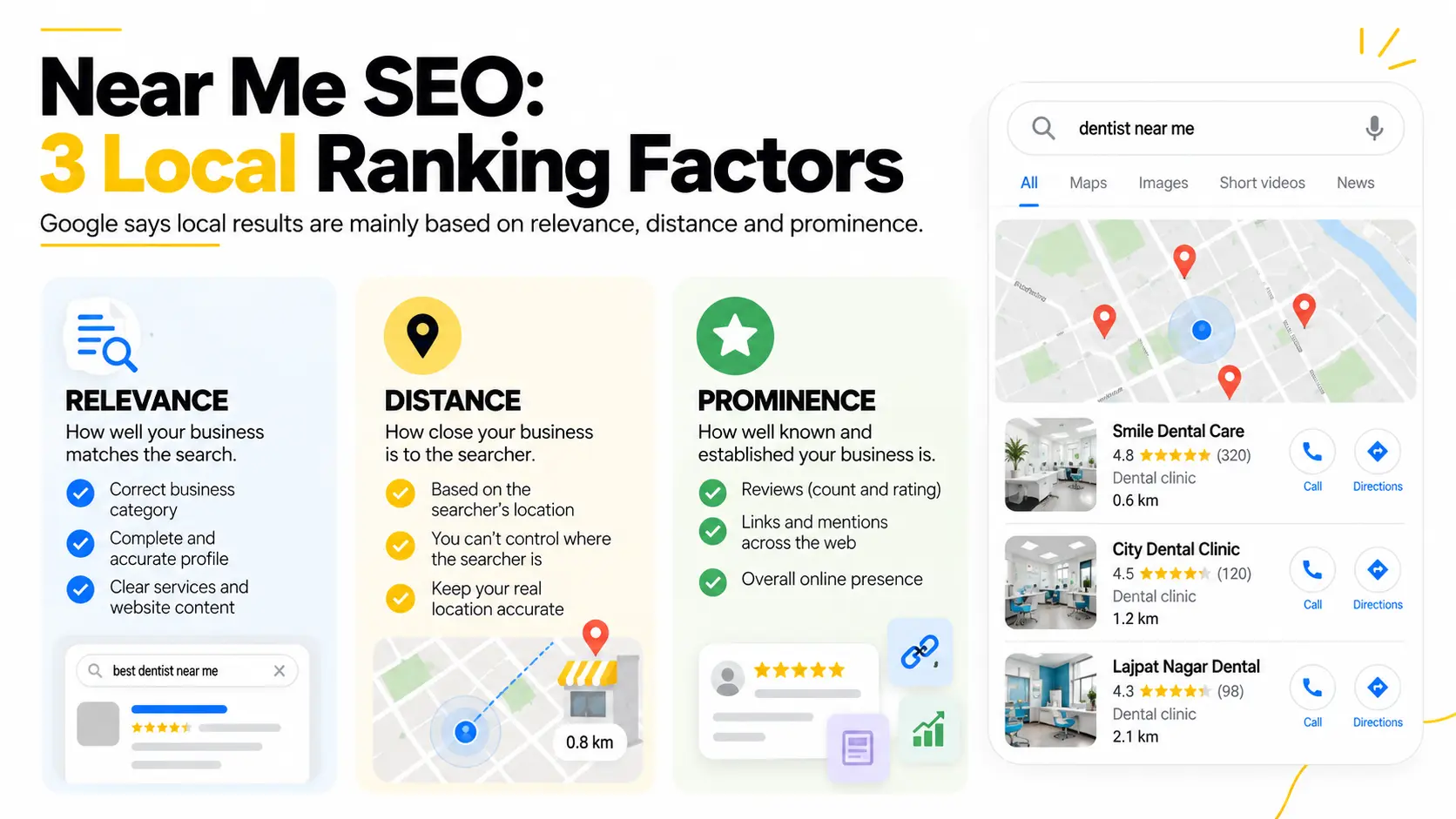
That is near me SEO in one example. “Near me” is not a keyword you add to a page. It is a request that Google answers using the searcher’s location. Google says local results are mainly based on relevance, distance and prominence, and that there is no way to request or pay for a better local ranking. Distance depends on where the searcher is and where you actually are. Your effort goes into relevance and prominence, and into competing where your business has a real presence.
This guide comes from how I review local profiles for small businesses in Delhi NCR. It separates what Google documents from what I have seen in practice. It also covers things most near me guides skip: what to do when a rival is closer, how Hindi and Hinglish searches fit in, how to ask for reviews on WhatsApp, and how to measure calls and visits.
Key takeaways
- “Near me” is a type of search, not a keyword. You don’t need to write it on your pages.
- Google names three main factors: relevance, distance and prominence. You can work on relevance and prominence. You can’t change distance.
- A complete, accurate Google Business Profile is the foundation. That means the right category, the correct address and pin, correct hours and real reviews.
- If a rival is closer, compete on what you can legitimately influence. That is category, profile completeness, reviews and clear service pages. Nothing here guarantees you’ll overtake them.
- Measure over weeks, not with one search. Track calls, direction requests, WhatsApp clicks and Search Console queries.
- Start small. The 30-day plan below fits into four weeks you can do alone.
Who this guide is for
This guide fits you if you own or market a business that customers visit or that travels to customers. Examples are clinics, salons, repair shops, coaching centres, restaurants, home services and accountants. It also suits small agencies that want one clear page to share with clients. If you sell only online and have no place or service area, a regular SEO plan will serve you better.
In a hurry? Read the key takeaways, run the self-test, then follow the 30-day plan. Come back to the rest when you hit a question.
How this guide was built
Google-related statements link to the Google page they come from. Numbers link to their source and say what they measure. Where Google gives no figure, this guide says so instead of guessing. The self-test, the “competitor is closer” table and the Hindi and Hinglish checks come from how I review local profiles, and I mark them as practitioner views. I don’t promise rankings, and nothing here depends on tricks. The update log at the bottom shows what changed and when.
On this page
Numbers worth knowing · What changed in 2026 · What is near me SEO? · How Google decides near me results · What if a competitor is closer? · How your Business Profile helps · Does adding “near me” to keywords help? · Why your business may not be showing · The 10-minute self-test · What to fix first, by business type · How to optimize, step by step · The 30-day plan · How to ask for reviews in India · Mistakes that risk suspension · What you can and cannot control · Turning visibility into calls · Businesses with many locations · Near me searches in India · Near me searches and AI answers · How to measure results · Glossary · Checklist · FAQ
Numbers Worth Knowing
Many articles on this topic repeat old percentages with no source. These figures tie to an official page or a named report, and the context column says what each one measures.
| Fact | Number | What it measures | Source |
|---|---|---|---|
| Main factors in local results | 3: relevance, distance, prominence | Google doesn’t say how much each counts | Google Business Profile Help |
| Time for profile edits to show | Up to 3 days | Google’s stated timing for changes to appear in search results | Google Business Profile Help |
| Time for a new business to rank | Up to a month | Google says rankings for new businesses can take up to a month to appear | Google Business Profile Help |
| Maximum service area | About 2 hours of driving from your base | For service area businesses | Google’s guidelines |
| Service areas you can add | Up to 20 | Cities, postal codes or other areas | Google Business Profile Help |
| Profiles for a service area business | One per metropolitan area | Google warns that multiple profiles for the same business in the same area can lead to suspension | Google Business Profile Help |
| Active internet users in India | 958 million | All internet use in 2025, not near me or local searches | Internet in India Report 2025 (IAMAI and Kantar), via Business Today |
| Share of those users in rural India | About 57% (around 548 million) | Share of active internet users | Same report, via Tele.net |
| Users who engaged with AI-enabled features | 44% | Use of features such as voice search, image search, chatbots and AI filters. It is not a measure of local search | Same report |
| FAQ rich results in Google Search | Stopped appearing May 7, 2026 | A change in how results are displayed | Google Search Central documentation updates |
What we could not find: a reliable, current number for how many near me searches happen in India. Google also doesn’t publish how much each ranking factor counts. So this guide quotes neither. If an article gives exact percentages for these, ask where they came from.
What Changed in 2026
- FAQ rich results are gone. Google’s Search Central documentation log says FAQ rich results stopped appearing in Search on May 7, 2026, and Google has since removed the documentation for the feature. This changes how results are displayed, not the value of a good FAQ. A clear FAQ still answers real customer questions, so this guide keeps one.
- Voice, image and chatbot features are widely used in India. The 2025 India report found that 44% of active users engaged with AI-enabled features. That figure doesn’t measure local search. See the AI section below.
- Google’s local ranking help still describes the same core idea. Local results are mainly based on relevance, distance and prominence.
What Is Near Me SEO?
The short version: near me SEO means making your business easy for Google to match, trust and show when someone searches for a nearby place. You can improve how well you match the search (relevance) and how well known you are (prominence). You can’t change where the searcher is or how far away you are.
A near me search is when a person wants a business or place close to where they are right now. Google’s own example is a customer who searches “Italian restaurant” on their phone and finds local places near them. Common versions are “dentist near me”, “restaurants near me open now” and “ATM near me”. These searches stand out for three reasons:
- They show local intent. The person usually wants a place, a phone number or directions, not an article.
- They are often made on a phone. A phone can share the person’s location. If it doesn’t, Google uses what it knows about their location.
- They often come when the person is ready to act. They want to visit, call, book or get directions.
“Near me” describes intent. A person who searches “Italian restaurant” on a phone can get nearby places with no “near me” in the search.
Not All Near Me Searches Are the Same
The need behind the search changes what Google has to check, and so what you should check on your profile.
| Search type | Example | What Google likely needs | What to check on your side |
|---|---|---|---|
| Plain near me | “dentist near me” | Your category and your location | Primary category, map pin |
| Open now or late hours | “pharmacy open now”, “24 hour chemist” | Correct hours | Hours, holiday hours, special hours |
| Locality named | “dentist in Lajpat Nagar” | A match to that area | Locality on your website and profile |
| Specific service | “paediatric dentist near me” | A close match to the service | Secondary categories, services list |
| Hindi or Hinglish | “dentist paas mein” | A clear match to natural language | Hindi or Hinglish terms on pages, where they are real |
Google doesn’t publish a rule for each search type. Use this table as a checklist, not as a promise.
How Google Decides Which Businesses Appear for Near Me Searches
Google says local results are mainly based on relevance, distance and prominence. Together, it says, these factors help Google find the best match for a search. It doesn’t say how much each one counts.
| Factor | What Google says | Can you influence it? |
|---|---|---|
| Relevance | How well a Business Profile matches what someone is searching for. Complete and detailed business info helps Google understand and match your business | Yes: categories, services, description, website content |
| Distance | How far each business is from the customer searching | Very little. You can only keep your location and service area correct |
| Prominence | How well known a business is, based on information such as how many websites link to it and how many reviews it has | Partly, and it builds over time |
Google’s help page also uses the word “popularity” for the third factor. It means the same idea.
Think of it as three questions. Does this business do what the person asked for? Is it close enough to the person right now? Is it well known and trusted?
Why Distance Matters in Near Me Searches
Distance is how far each business is from the person searching. It changes with every search, so you can’t edit it. Dentist A is near Karol Bagh Metro and Dentist B is near Rajendra Place. A person outside Karol Bagh Metro may see A first. A person near Rajendra Place may see B first, even if A has more reviews. This is an example to explain the idea, not a measured result.
Is there a fixed radius, like 3 km? Google doesn’t publish one. Practitioner view: in a busy area like central Delhi, many options sit close together, so being a little further away may cost you more than in a small town. Test this in your own market.
You can’t manipulate distance, and trying can backfire. Google’s guidelines say a business should use a precise, accurate address and/or service area, and that a virtual office isn’t eligible for a profile. What you can do is make sure your location is right and build relevance and prominence, so you stay a strong choice when distance isn’t on your side.
What Is Relevance?
Relevance is how well your business matches what the person searched for. Being close is not the same as being a good match. Google says complete and detailed business info helps it match your profile to relevant searches. Your category, services, description, website content and hours all feed into that picture.
Take “paediatric dentist near me”. A general clinic 300 metres away and a children’s specialist 2 km away are not equal matches, and the specialist may be the better fit for that search. Or take “pharmacy open now”. A pharmacy with wrong hours on its profile is a weaker match, however close it is.
What Is Prominence?
Google describes prominence as how well known a business is, and says it is based on information like how many websites link to your business and how many reviews you have. Google also says more reviews and positive ratings can help your local ranking. Mentions, directory listings and a long, consistent presence are the kind of signals this idea covers.
Prominence builds slowly. Don’t buy or fake reviews. Google’s Maps content policy calls incentivized or biased reviews rating manipulation and says they will be removed.
What If a Competitor Is Closer? How to Compete
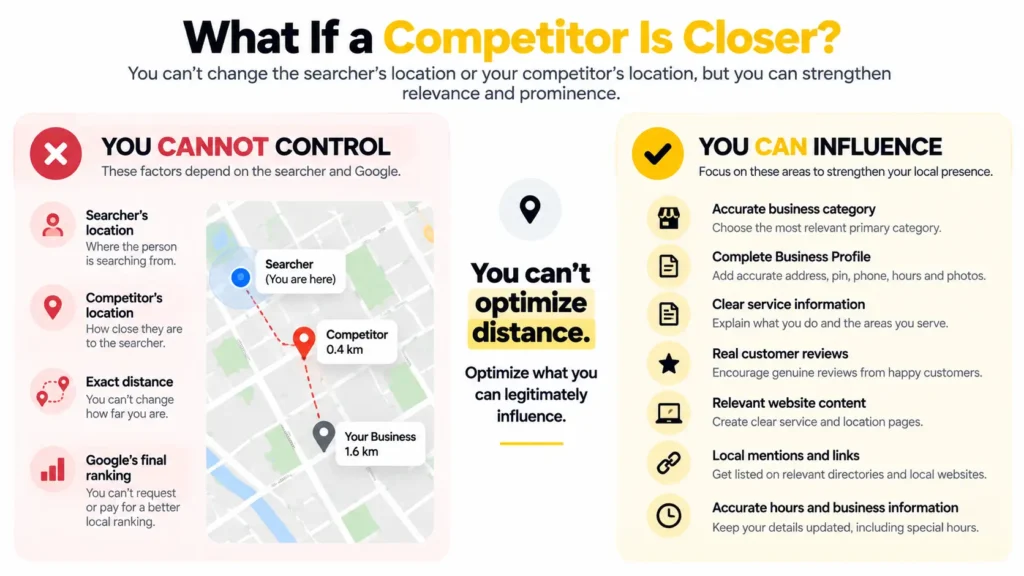
The answer is simpler than it sounds: you can’t change the distance, and nothing here guarantees you’ll overtake a closer rival. What you can do is improve the factors you legitimately influence and compete where your business has a real presence.
This is the question owners ask most. If a rival sits 200 metres from the searcher and you sit 2 km away, editing your profile alone may not win that search. You can’t optimize distance, so optimize the factors you can legitimately influence.
You Cannot Control
- The searcher’s location
- Your competitor’s location
- Google’s final ranking
- Exact distance
You Can Influence
- Category accuracy
- Business Profile completeness
- Service information
- Legitimate reviews
- Website relevance
- Local mentions, links and citations
- Customer experience
- Tracking
The Levers, With Evidence Levels
| Lever | What to do | Evidence level |
|---|---|---|
| Precise primary category | Pick the category that matches your main service, not a broad one | Google says relevance matters and links to guidance on managing your category. It doesn’t publish how much categories count. Practitioner view on precision |
| Review count and rating | Earn more real reviews and a strong rating | Google says more reviews and positive ratings can help your local ranking |
| Recent reviews and replies | Keep a steady flow of new reviews and reply to them | Google says positive reviews and helpful replies can help your business stand out. Practitioner view on recency |
| Complete profile | Fill in services, hours, description and real photos | Google says businesses with complete and accurate info are more likely to show up in local search results |
| Accurate hours | Keep hours and holiday hours right | Matters directly for “open now” searches. Google lists hours among the details to keep complete |
| Local links and mentions | Earn mentions from local news, groups and partners | Google says prominence is based on info such as links to your business |
| A page for each key service in your area | One clear page per main service, with your locality and address | Practitioner view |
Pick your battles. Run the self-test below and note where you appear and where you don’t. You may be strong in your own locality and weak one road away. Build for the areas where you already show up, then widen the circle. Practitioner view: locality-named searches (“dentist in Lajpat Nagar”) can be easier to compete in than a plain “near me” search from a crowded spot, because they point at an area rather than at the searcher’s exact position. Test this in your market.
How Your Google Business Profile Helps
Your Business Profile is where Google reads your business details for Maps and local results. Google says it can use your profile to improve your local ranking, and that verifying your business tells Google you’re authorized to represent it, so it’s more likely to show up. Filling every field doesn’t guarantee a higher position, but gaps and mistakes can hold you back. Our local SEO services start with this step.
- Business name: Use the name on your real signage. Google says including unnecessary information in your business name isn’t permitted and could lead to suspension.
- Primary category: Pick the one that best describes your main service. See Google’s guide to managing your category.
- Secondary categories: Add only those that truly describe what you do.
- Description and services: Plain words about what you do and who you serve.
- Business hours: Keep them current, including holiday and special hours.
- Phone and website: Use the same details as your website and listings.
- Location: Enter your full, correct address and place the pin carefully. Google explains how to manage your business address.
- Service area: If you travel to customers, set the areas you really serve.
- Photos: Real photos of your premises, team and work, including a clear photo of your entrance.
- Reviews: Ask real customers and reply to what they write.
A Good Description, Side by Side
Your profile description is plain text, so it is easy to get wrong. Compare these two for a made-up dental clinic.
| Weak | Better |
|---|---|
| “Best dentist near me in Delhi. Cheap dentist near me. Top dental clinic Delhi near me.” | “Family dental clinic in Lajpat Nagar, on the first floor above the pharmacy. We do check-ups, fillings, root canals and braces for children and adults. Open Monday to Saturday, 10 am to 8 pm. Walk-ins welcome.” |
The weak one repeats a phrase and tells a patient nothing. The better one names the place, the services, the hours and how to find the door. Write yours the same way, with facts that are true for your business.
Does Adding “Near Me” to Keywords Help?
Not as a tactic on its own. Local intent comes from the searcher’s location and the search, so your pages don’t need the words “near me”. Google’s local ranking help doesn’t list “near me” wording as a factor. It points to relevance, distance and prominence. Repeating the phrase also reads badly (“Best dentist near me in Delhi near me clinic” helps nobody).
Write for the place and the need: your locality name, your services, how to reach you, your hours and answers to common questions. A line like “near Karol Bagh Metro Station” is fine where a real person would say it.
Why you will see conflicting advice. Some guides say to add “near me” to titles and headings, and others say never to. The difference is easy to miss. Naming your real locality (“dentist in Karol Bagh”) helps readers see where you are. Repeating “near me” is the part that adds nothing.
Myths vs Facts
| Myth | Fact |
|---|---|
| “Add ‘near me’ to every page and you will rank.” | Google’s local ranking help names relevance, distance and prominence, not “near me” wording. |
| “There is a 3 km rule.” | Google doesn’t publish a radius. |
| “More categories means more rankings.” | Add only categories that truly describe you. |
| “A new profile ranks in a week.” | Google says rankings for new businesses can take up to a month. |
| “I can buy a top Maps position.” | Google says there’s no way to request or pay for a better local ranking. |
| “One search on my phone shows my rank.” | That only shows what you see, from where you stand. |
| “100 city pages will cover 100 cities.” | Google’s spam policies describe doorway abuse as pages created to rank for specific, similar search queries. |
Why Your Business May Not Be Showing for Near Me Searches
In practice, the usual suspects are distance, a wrong or incomplete profile, a weak category, a misplaced pin, few reviews, mismatched listings and strong local competition. These are possible reasons, not sure causes. Google itself says that if your info isn’t accurate, your profile might not show up for relevant searches in your area.
| # | Possible reason | How to check |
|---|---|---|
| 1 | You are too far from the searcher | Search from a few spots near your business and compare |
| 2 | Profile information is incomplete or wrong | Compare name, address, hours, phone and website with real life |
| 3 | The category doesn’t match the service | Does your primary category match what people search for? |
| 4 | The website doesn’t explain services or location | Can a visitor see what you do and where within seconds? |
| 5 | Weak local prominence | Do few sites mention or link to you? |
| 6 | Few reviews or a weak rating | Compare your reviews with nearby competitors |
| 7 | Details differ across directories | Search your name and phone number and look for mismatches |
| 8 | Weak or missing local citations | Check the listings your customers actually use |
| 9 | Poor local page structure | Are location pages thin, copied or hard to find? |
| 10 | Strong local competition | Look at who holds the map results in your area |
| 11 | You don’t serve the searched location | Check that your service area matches where you work |
| 12 | Results change with location and device | Test from several places before you decide anything |
| 13 | The map pin is off | Zoom in on your profile. Is the pin on your building, not on the road or the next lane? |
| 14 | Your hours are wrong for “open now” searches | Check regular, holiday and late-night hours |
| 15 | The profile isn’t verified | Google says verifying tells it you’re authorized to represent the business, so it’s more likely to show up |
Start with rows 2, 3, 4, 13 and 15. They are the quickest to check and fix. Rows 1, 10 and 12 you can only work around.
Not sure which of these is holding you back? A local SEO audit can show the profile, website and local visibility gaps before you spend money on more content or ads. See how a website SEO audit works, or book a 30-minute call.
The Lee Growth Self-Test: Check Your Near Me Visibility in 10 Minutes
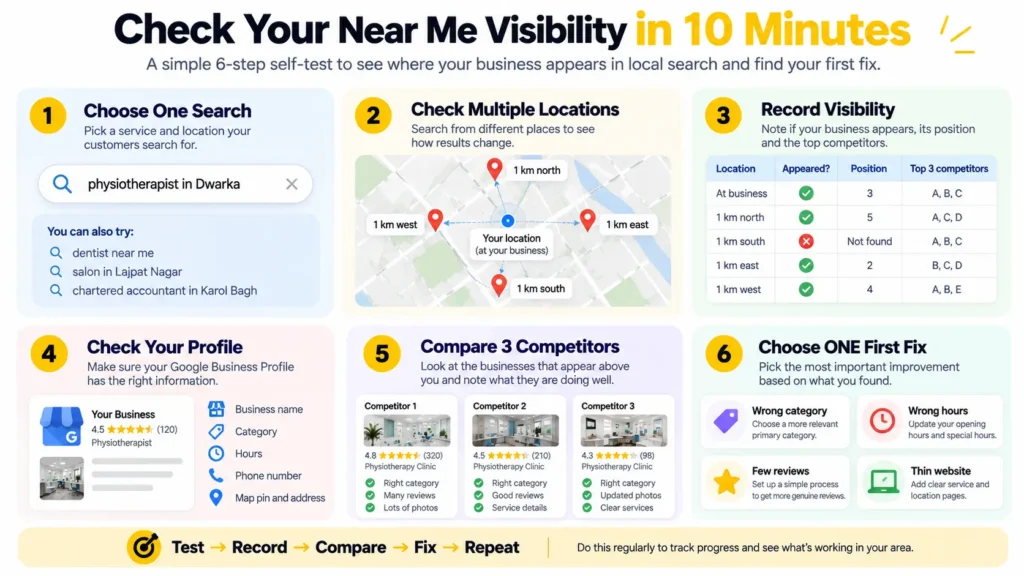
You need a phone and a notepad. The goal is not a perfect ranking report. It is to find your first fix.
Step 1: Choose One Service and One Search
Use your main service with your locality or city, for example “physiotherapist in Dwarka”. Stick to one search for the whole test.
Step 2: Check From Multiple Locations
Stand at your shop, then about 1 km north, south, east and west, and search each time. A private window reduces personalization, but it doesn’t hide your location. Then repeat once in Hindi or Hinglish, for example “physiotherapist paas mein”, and note whether the results change.
Step 3: Record Your Visibility
Write down whether you appear in the map results and at which position. The sheet below gives you a format.
Step 4: Check Your Business Profile
Check that name, hours, phone, category and pin match real life. Then search your phone number. An old or different business name or address is a listing to fix.
Step 5: Compare the Top Three Competitors
Look at their primary category, review count and number of photos.
Step 6: Choose ONE First Fix
Pick the gap that is easiest to close: wrong category, wrong hours, few reviews or a thin website.
How to read the result: if you appear at your shop but not 1 km away, distance may be the limit, and relevance and reviews are your levers. If you don’t appear even at your shop, start with the profile and the category.
A Simple Sheet to Record Your Test
Fill it once now and again after 30 days, so you see real change instead of guessing.
| Spot | Search used | Did you appear? | Position | Top 3 names |
|---|---|---|---|---|
| At your shop | ||||
| 1 km north | ||||
| 1 km south | ||||
| 1 km east | ||||
| 1 km west | ||||
| Hindi or Hinglish search |
What to Fix First, by Business Type
The best first fix depends on how customers reach you. This table is a practitioner view built on Google’s guidance, so adjust it to your own self-test.
| Your business | Fix first | Then | Watch out for |
|---|---|---|---|
| Walk-in shop, clinic, salon or restaurant | Map pin, full address with floor, hours, entrance photo | Reviews, then services list | Wrong hours and a pin on the road |
| Home service such as plumber, electrician or AC repair | Service area, hidden address, primary category | Reviews with the type of job, then phone and WhatsApp | Listing a home address or an area you don’t serve |
| Professional such as accountant, lawyer or consultant | Specific category, clear service pages, reviews | Local mentions and links | Broad categories and a thin website |
| Coaching centre or school | Course and fee clarity, hours, photos | Reviews from students and parents, locality pages that add real value | Reviews asked for in a pushy way |
| Two or more real branches | One accurate profile per branch | One useful page per branch with true details | Copied pages that swap only the city name |
How to Optimize for Near Me Searches, Step by Step
Fix your profile first, then your category, then your listings and reviews. Website pages and links come after that.
- Optimize your Business Profile. Claim it, verify it and complete every field that applies.
- Choose the correct category. Pick the one closest to your main service, and check which categories your top local competitors use.
- Make your business details consistent. Your name, address and phone number (NAP) should match across your profile, website and listings. Small differences, like an old phone number, can leave Google unsure which details are right.
- Build real customer reviews. Ask after a good experience, share your review link and reply to every review. Google has tips to get more reviews. Never pay for reviews. The WhatsApp section below shows how.
- Improve local relevance on your website. State your services, your area and your address clearly. Put your NAP on the contact page and make sure the site loads fast on a phone. Our SEO services cover on-page work like this.
- Create location or service pages only where they add real value. Don’t publish hundreds of thin city pages that swap one place name into the same text.
- Build relevant local citations. List your business on directories your customers use. Accuracy matters more than the number of listings.
- Earn local links and mentions. Local news, industry groups, chambers of commerce, event pages and partner sites are natural sources. Earn them, don’t buy them.
- Strengthen local content. Answer questions people in your area really ask. If you want help, see our SEO content writing services.
- Track your progress. Use Business Profile performance and Google Search Console. One manual search tells you very little.
The Lee Growth 30-Day Local SEO Plan
This is an implementation timeline, not a ranking guarantee. Google says profile edits can take up to 3 days to appear and rankings for new businesses up to a month. Don’t judge results in week 1, and expect small signs of change first, not a jump.
| Week | Focus and outcome | Tasks | Done when |
|---|---|---|---|
| 1 | Profile accuracy. Business information matches reality. | Run the self-test. Verify the profile. Fix name, category, address, pin, hours and phone. Add an entrance photo. | Everything on the profile matches real life |
| 2 | Website and local signals. Services and location are clearly explained. | Add your NAP and map link to the contact page. Make the phone number tap-to-call. Fix mismatched listings on directories. | Name, address and phone are identical everywhere |
| 3 | Reviews. A repeatable review-request process exists. | Save your review link. Send it to each customer after the visit. Reply to every existing review. | You have a repeatable habit, not a one-time push |
| 4 | Measurement. Baseline and comparison data exist. | Add UTM tags to the profile link. Track WhatsApp clicks. Repeat the self-test and compare with week 1. | You can see calls, directions and clicks in one place |
After day 30, keep going with one useful page or one local mention each month. Small steady work beats a single big burst. In week 2, a website SEO audit can show what your pages are missing. In week 4, our Google Search Console guide helps you read the queries that bring people to you.
How to Ask for Google Reviews in India (WhatsApp Included)
Most Indian customers are already on WhatsApp, so a short, polite message with your review link after the visit is a practical way to ask. Google’s Maps content policy sets the rules. Under it, incentivized or biased reviews are not allowed and will be removed. In practice, that means:
- Ask every customer, not only happy ones. Don’t discourage negative reviews or selectively solicit positive ones.
- Don’t offer money, discounts, gifts or any reward for a review, including to change or remove a negative one.
- Don’t require or pressure people to leave a review while they are on your premises.
- Don’t ask for specific content to be included in the review.
- Don’t ask staff to collect a set number of reviews.
- Reply to every review, including negative ones, calmly and without arguing. Google says positive reviews and helpful replies can help your business stand out.
Get your review link from your Business Profile and save it on your phone. Two messages you can adapt:
English: Hi [Name], thank you for visiting [Business] today. If you have a minute, an honest review helps other people nearby find us: [link]. Thank you.
Hinglish: Namaste [Name] ji, aaj [Business] aane ke liye dhanyavaad. Agar time mile to apna honest review yahan likhein: [link]. Isse aas-paas ke logon ko madad milti hai.
Practitioner view: a steady flow of new reviews over months looks healthier than a burst of 30 in one week followed by silence. Aim for a habit, such as sending the link at the end of each job.
How to Reply to Reviews
A reply is a public message to the next customer, not only to the reviewer. Keep it short, calm and specific.
| Type of review | Example reply |
|---|---|
| Positive | “Thank you, [Name]. We are glad the check-up went smoothly. See you at your next visit.” |
| Negative | “We are sorry the wait was long, [Name]. That is not how we want a visit to go. Please call us on [number] so we can look into it.” |
| Unfair or fake | “We could not find a visit under this name. Please contact us on [number] with the details so we can check.” Then report it to Google if it breaks the policy. |
Never argue, share private details about the customer or offer a reward to change the review.
Near Me SEO Mistakes That Hold You Back or Risk Suspension
Some of these only slow you down, and others can get your profile suspended. Check the list against your own profile.
| Mistake | Why it hurts | Do this instead |
|---|---|---|
| Adding keywords or locations to the business name | Not permitted under Google’s guidelines and could lead to suspension | Use the name on your real signage |
| Using a virtual office or fake address | A rented mailing address where you don’t operate is not eligible for a profile | Use a real, staffed location, or hide the address and list a service area |
| Making several profiles for one business | Google warns multiple profiles for the same business in the same metropolitan area can lead to suspension | One profile per real location, or one for your metro area if you travel |
| Buying or trading reviews | Not allowed under Google’s Maps policy, and customers can tell | Ask every real customer with a polite message |
| Asking only happy customers | Selective asking is not allowed | Ask everyone and reply to all reviews |
| Wrong or old hours | Hurts “open now” matches and earns angry reviews | Update hours and holiday hours every time they change |
| Different address styles across sites | Can look like a mismatch | Pick one format and copy it everywhere |
| Hundreds of near-identical city pages | Can count as doorway abuse | Write a page only where you have something real to say |
| Checking rank with one search on your own phone | You only see your own view | Use the self-test or a geo-grid check |
| Never replying to reviews | Misses a chance to show care to the next customer | Reply to every review, short and calm |
If your profile is suspended, read Google’s guidelines first, fix the cause, then follow the reinstatement steps in Business Profile Help. Don’t open a new profile to get around it.
What You Can and Cannot Control
| Signal | Can you influence it? | How? |
|---|---|---|
| Business Profile details | Yes | Keep them complete, correct and current |
| Business category | Yes | Pick the best primary category, add true secondary ones |
| Business services | Yes | List what you really offer, in plain words |
| Website relevance | Yes | Clear service and location details on key pages |
| Reviews | Partly | Ask real customers and reply. You can’t control what people write |
| Citations | Yes | Keep accurate listings on relevant directories |
| NAP consistency | Yes | Use the same name, address and phone everywhere |
| Local content | Yes | Publish useful pages about your services and area |
| Local backlinks | Partly | Earn mentions through real local relationships |
| Business location | Limited | Choose it when you open or move, and keep it accurate |
| Searcher’s location | No | It belongs to the person searching |
| Distance | No | Google works it out from the searcher’s position |
| Competitor locations | No | Your competitors decide where they trade |
| Google’s final ranking | No | Google keeps the algorithm details confidential |
Treat any promise of a guaranteed first position on Google Maps as a warning sign. Google says there is no way to request or pay for a better local ranking.
What Lee Growth will and will not do: I will fix your profile, category, website and listings, and help you earn real reviews and links. I will not promise a rank, buy reviews, make fake addresses or publish copied city pages.
Turning Local Visibility Into Calls and Visits
Showing up is half the job. Make the next step easy.
- Tap-to-call: put the button near the top of the page on a phone.
- Hours: a closed shop that shows “open” costs you a customer and can earn a bad review.
- Services and products: list them on your profile where Google offers it for your category.
- Booking link: add one where Google offers it for your category and you take bookings.
- Timing words: if it is true, say “same-day service”, “walk-ins welcome” or “open till 10 pm”. If it isn’t, leave it out.
- Finding the door: add the floor, shop number and a short landmark to your description, plus a clear entrance photo.
- Directions: add a map link on your contact page.
- Tracking: tag your profile’s website link so you can see what it brings. The tracking table below shows how.
Near Me SEO for Businesses With Many Locations
- Many physical locations. Each real, staffed location can have its own profile and its own page. Each page needs details that are true for that location: address, hours, team, services and directions.
- Service area businesses. If you travel to customers, Google says to create only one profile for the metropolitan area you serve, and to hide your address if you have no storefront where you receive customers. It also says the service area shouldn’t extend farther than about 2 hours of driving from where you’re based.
- Regional targeting. One strong page about a region or service can serve many nearby places.
- The NCR trap. If you serve Delhi, Noida and Gurgaon, don’t publish three pages that swap the city name in the same text. That is thin, duplicate content and can count as doorway abuse. Give each page something only that place has: its own address and hours if you have a real location there, local examples, directions and the team that serves it. If you have no real presence in a city, one clear service area page is safer than a copy.
Firm rules: no fake addresses, no fake or duplicate profiles and no doorway pages. A location page should help a real visitor, not just catch a search.
Near Me Searches in India: Local SEO for Delhi NCR and Beyond
India-Specific Facts
The Internet in India Report 2025, from IAMAI and Kantar, counts 958 million active internet users, with rural India about 57% of them. It also found that 44% of users engaged with AI-enabled features such as voice search, image search, chatbots and AI filters. These numbers show the size of the online audience. They don’t show how many people make near me searches or use Google Maps.
Practical Observations From Local SEO Work
These are practitioner views, not published rules.
- Think in localities. In dense markets, people often search by area name. Use your locality naturally on your website and profile.
- Expect crowded roads. Many similar shops can sit on one road. In close contests, reviews and relevance may be what separates results. Check your own market.
- Hide your address if you work from home. Plumbers, tutors, electricians and consultants can list service areas instead, as Google’s service area guidance describes.
- Use the directories your customers use. Examples are Justdial, Sulekha, IndiaMART for B2B, Bing Places and Apple Maps. Keep the details identical.
- Build for mobile. Pages should load fast on mid-range phones, with a tap-to-call button and a clear map link.
Address and Pin Problems to Check
Indian addresses cause a lot of profile trouble in my reviews, so check these first:
- Floor and unit missing. Google asks for your full address if customers can visit. Include the floor, shop or office number, and the block, sector or phase if your area uses them.
- Pin on the road, not the building. Zoom in on your profile and move the pin onto your building. A pin in the wrong lane may change the distance Google measures.
- Different address styles across listings. “Sector 18, Noida” on one site and “Sec-18 Noida” on another can look like a mismatch. Pick one format and copy it everywhere.
- Shared buildings and co-working spaces. Google’s guidelines say a service area business can’t list a virtual office unless it is staffed during business hours. Read them before you list a shared address.
- Home-based business. Hide the address and list a service area instead.
Hindi and Hinglish Searches
People in India mix English, Hindi and regional languages, so a search like “dentist paas mein” or “AC repair mere paas” is realistic. Whether your site needs wording changes depends on your customers, so look at your data before writing anything.
- Check Search Console first. Filter queries by your locality names and common Hindi words to see what people already type. Our Google Search Console guide shows how.
- Use customers’ words where it’s natural. A service page that names the service the way customers say it can read better than one using only the technical term. Don’t make a Hinglish page for every keyword. Add a short plain-language line, not a keyword list.
- Test it with the Hindi or Hinglish search in the self-test.
Practitioner view: results for Hindi or Hinglish searches can differ from the English version of the same search. This is an observation from testing, not a published Google rule, so test it for your area.
Metro or Smaller Town: Check, Don’t Assume
It is often said that smaller cities are easier to rank in because fewer businesses have strong profiles. That may be true for your area, but check first. Search your main service plus your locality. Look at the top 3 map results: how many reviews and photos do they have, and are their hours and categories complete? If they are thin, the gap may be easier to close. If they are strong, plan for a longer climb.
Near Me Searches and AI Answers
People use voice assistants, image search and chatbots alongside regular search. The India report shows 44% of users engaged with such features, though it doesn’t say how many of them use these features for local questions. I haven’t found official guidance from Google on how AI answers choose local businesses, so this guide doesn’t claim a formula. Google does say its spam policies cover attempts to manipulate generative AI responses, so tricks are a poor bet here too. These steps are low-risk good practice, not a confirmed method:
- Keep every fact identical. Name, address, phone, hours and services should match across your profile, website and listings. Mixed details are easy for any system to repeat wrongly.
- Write direct answers. Say what you do, where you are, when you’re open and how to reach you, in plain crawlable text near the top of the page. Don’t leave key facts only inside images.
- Use question-style headings where a person would ask the question out loud.
- Consider LocalBusiness structured data on your contact page. Google explains the format in its local business structured data guide. It helps describe your business and doesn’t guarantee any placement.
- Show who wrote the page and when. A named author, a business name and a clear update date make a page easier to trust.
For more, read our guide to AI search engine optimization.
How to Measure Near Me SEO Results
Searching “your service + near me” on your own phone is not a reliable ranking check, because you only see your own view. Track these over weeks:
- Business Profile views, searches, calls, direction requests and website clicks
- Local organic traffic from searches with locality names
- Rankings for locality and service terms in Search Console
- Calls, forms and bookings that began with a local search
Google has a guide to understanding your Business Profile performance and insights. Calls and direction requests are often the clearest sign of real local interest. One-day movements usually mean little.
A Simple Tracking Setup
| What | How | Where to see it |
|---|---|---|
| Visits from your profile | Add UTM tags to the website link on your profile, e.g. ?utm_source=google&utm_medium=organic&utm_campaign=gbp | Google Analytics |
| Calls and direction requests | Built in | Business Profile performance |
| WhatsApp clicks from your website | Track clicks on your WhatsApp button as an event | Google Analytics, through Tag Manager |
| Local search queries | Filter by locality names and Hindi or Hinglish words | Search Console |
| Visibility around your location | A geo-grid rank check tests your position at many points around your address instead of one. Paid local rank trackers such as BrightLocal offer it | Rank tracker |
A geo-grid check solves the “one search on my phone” problem by showing where you appear and where you vanish. For options, see our list of SEO tools for small businesses in India.
How to Read Your Numbers
These are readings to test, not rules. Google doesn’t publish how it weighs these numbers.
| What you see | What it may mean | What to try |
|---|---|---|
| Views up, calls flat | People find you but don’t act | Check hours, phone number, photos and reviews |
| Direction requests up, few visits | The pin or the address may be off | Check the pin and add an entrance photo |
| Calls up, few bookings | The call or booking step loses people | Check who answers, and when |
| Strong near your shop, weak further out | Distance may be the limit | Build reviews and relevance, and aim for locality-named searches |
| No change after 30 days | Fixes may not have reached the cause | Repeat the self-test and recheck the category and pin |
Plain-Language Glossary
| Term | What it means |
|---|---|
| Google Business Profile | The free listing that shows your business on Google Search and Maps |
| NAP | Name, address and phone number. They should match everywhere |
| Citation | Your business details on another website, such as a directory |
| Map pack | The short list of businesses with a map shown at the top of local results |
| Primary category | The one label that best describes your main service on your profile |
| Service area business | A business that travels to customers instead of serving them at a shop |
| Prominence | How well known a business is. Google’s help page also calls this popularity |
| Geo-grid | A set of points around your address used to check your position from many spots |
| UTM tag | A short piece added to a link so analytics can show where visits came from |
The Local Visibility Checklist
- Business Profile is claimed, verified and correct
- Correct primary category selected
- Relevant services added
- Business hours updated, including holidays and late hours
- Address is complete and the map pin sits on the building
- Entrance photo added
- Website is linked to the profile
- Name, address and phone match everywhere
- Review link saved and sent to every customer
- Reviews are answered
- Website clearly explains services
- Location details are clear on the website
- Location pages exist only where they add real value
- Local citations are accurate
- Hindi or Hinglish searches checked in Search Console
- Local content answers customer questions
- Local mentions and links are being earned
- Profile website link is tagged and WhatsApp clicks are tracked
- Maps visibility is tracked over time
Frequently Asked Questions About Near Me SEO
1. What are near me searches?
They are searches where someone wants a business close to their current location, such as “dentist near me”. The phrase asks Google to work out the location itself, using the device’s location or what Google knows about the person’s area. It describes intent rather than being a keyword you must publish.
2. How does Google decide near me results?
Google says local results are mainly based on relevance, distance and prominence. Relevance is how well a profile matches the search, distance is how far the business is from the searcher, and prominence is how well known it is. Google doesn’t say how much each factor counts.
3. How important is distance for local SEO?
Distance is one of the three factors Google names, and it can strongly shape who appears for a given searcher. It is also the one factor you can’t change by optimizing. That is why improving relevance and prominence, and keeping your location accurate, matters more than trying to game it.
4. How do I rank for near me searches?
Keep your Business Profile accurate, choose precise categories, earn real reviews, keep your details consistent and make your website clear about what you do and where. These steps can improve your chances of appearing. Nobody can guarantee a position, because distance and Google’s final ranking are outside your control.
5. Does adding “near me” to keywords help SEO?
Not as a tactic. Google works out local intent from the search and the searcher’s location, so natural local relevance matters more than the phrase. Using your real locality name (“dentist in Karol Bagh”) is different, and it helps readers and search engines understand where you are.
6. Why is my business not showing in near me searches?
Common reasons include distance, incomplete profile details, a weak category choice, a misplaced map pin, an unverified profile, thin local signals, mismatched listings or strong competition. These are possible causes, not certainties. The table above lists them and shows how to check each, starting with the quickest ones.
7. How does Google Business Profile affect near me searches?
Google uses your profile details to judge how well you match a search, and says businesses with complete and accurate info are more likely to show up. Reviews and web mentions feed into how well known you are. A complete, correct profile improves your chances, but it doesn’t guarantee a position.
8. How can I improve Google Maps visibility?
Verify and complete your profile, pick accurate categories, collect real reviews, reply to them, keep hours current and add real photos. Google says edits can take up to 3 days to appear and rankings for new businesses up to a month. Judge progress over weeks, not days.
9. Can I rank for near me searches without “near me” on my website?
Yes. A clear category, clear services and clear location details matter more than the phrase. Describe what you do, where you are and how people can reach you in plain words. Your Business Profile does much of the matching for local results, and your website supports it.
10. Can businesses control their distance from the searcher?
No. Distance depends on where the searcher is and where your business is. You can keep your location accurate, set a realistic service area and strengthen relevance and prominence. You can’t change the distance, and fake addresses or extra profiles risk suspension under Google’s guidelines.
11. What is the difference between local SEO and near me SEO?
Local SEO covers everything that helps a business appear in local results, including profile work, reviews, citations, website content and links. Near me SEO is the part focused on searches where Google uses the searcher’s location to decide what is nearby. In practice, the work overlaps almost completely.
12. How can I improve local search visibility in India?
Use full addresses and an accurate pin, add locality names naturally, keep details identical across directories such as Justdial and Sulekha, and make pages fast on mobile. Then build real reviews and local mentions over time. Check your own Search Console data for how customers actually search.
13. How can I rank when a competitor is closer to the searcher?
You can’t change the distance, and improving other factors doesn’t guarantee you’ll overtake them. What you can do is strengthen a precise primary category, real reviews, profile completeness, accurate hours and local mentions. Then focus on the locality-named searches and areas where you already appear.
14. Should I use Hindi or Hinglish keywords?
Only where they’re natural and your customers actually use them. Check your Search Console queries first, and test your own searches in Hindi or Hinglish before you write anything. A short plain-language line on a service page usually makes more sense than separate pages for every keyword.
15. How do I ask customers for Google reviews on WhatsApp?
Send your Google review link in a short, polite message after the visit. Ask every customer, and don’t offer discounts or gifts for a review. Don’t pressure people or dictate what to write. Reply to each review afterwards. The WhatsApp section above includes English and Hinglish message templates.
16. How can I track calls and WhatsApp leads from my profile?
Calls and direction requests show in Business Profile performance. Add UTM tags to your profile’s website link to see those visits in Google Analytics. Track clicks on your WhatsApp button as an event, for example through Google Tag Manager, so you can compare channels in one place.
17. Do near me searches work differently in smaller towns?
Google’s help pages name the same factors regardless of city size and don’t describe a separate small-town system. What often differs is the competition. Check the top three map results for your service and locality to see how complete their profiles are, then plan accordingly.
18. How long does near me SEO take to work?
Google says profile edits can take up to 3 days to appear and rankings for new businesses up to a month. Reviews, links and local mentions build over months, and there is no guaranteed timeline. Judge progress over weeks using calls, direction requests and Search Console data.
19. Do I need a website to show up in near me searches?
A Business Profile can appear without a website, but a clear site gives Google and customers more to go on. It is where you explain services, show your location and put a tap-to-call button. For most businesses, a simple, accurate site is worth having.
20. Is near me SEO free?
The profile, Search Console and the self-test are free. Paid tools such as geo-grid rank trackers are optional. Never pay anyone who promises a guaranteed Maps position, because Google says there is no way to request or pay for a better local ranking.
Keep Reading: More Guides From Lee Growth
- Google Search Console Guide: 25 Things Every Small Business Should Check. Use it to find the locality and Hindi queries this guide asks you to look for.
- AI Search Engine Optimization Services: How AI SEO Helps Your Business Get Found. Read it for the voice and AI answer side of search.
- Best Free SEO Tools for Small Businesses in India. Free and paid tools for tracking and rank checks.
Browse more on the Lee Growth blog or in the SEO category.
Need Help With Near Me SEO?
If you’re not sure why your business is missing from near me searches, a second pair of eyes can save weeks of guessing. Lee Growth is a solo consultancy in Delhi NCR. I help startups and small businesses with SEO, Google Business Profile optimization and local visibility, with no ranking guarantees.
See our local SEO services | Book a 30-minute call | Contact Lee Growth | All services
About the Author
Leena Kalyana is a freelance digital marketer in Delhi and the founder of Lee Growth. She works on content, SEO and outreach for client websites and for her own site, and her background is in graphic design. She writes guides like this one to explain SEO in plain words, with sources a reader can check.
Spotted something out of date or wrong? Tell me and I’ll check it and fix it.
Sources
Google documentation
- Tips to improve your local ranking on Google
- Find your business on Google (edit and new-business timing)
- Guidelines for representing your business on Google
- Create a Business Profile on Google (service area businesses)
- Maps prohibited and restricted content policy
- Spam policies for Google web search
- Local business structured data
- Google Search Central documentation updates
India data
- India’s internet user base tops 950 million as rural growth, AI drive adoption (Business Today)
- India’s internet user base crosses 950 million in 2025 as per IAMAI report (Tele.net)

I’m Leena Kalyana, a Delhi-based freelance digital marketer and graphic designer. I work across SEO, content marketing, social media, and digital design. I’m interested in helping businesses build a stronger online presence through practical SEO strategies, useful content, and creative digital marketing.
[…] 2, while the blog still gets no visitors. This is normal. Check each clock by its own numbers. See Near Me SEO to learn about […]