



From zero to local customers — a complete India setup, verification, and review guide
Google Business Profile setup India is one of the most effective ways for small businesses to improve local visibility, rank higher in Google Maps, and attract more customers from nearby searches. If your business is not appearing when potential customers search for your products or services, an incomplete or unoptimized Google Business Profile could be the reason.
This Google Business Profile setup India guide covers everything you need to know, including account creation, verification methods, category selection, profile optimization, review generation, and local SEO best practices. Whether you’re a local shop, service provider, consultant, restaurant, or startup, following the right Google Business Profile setup India process can help you increase visibility, build trust, and generate more leads from Google Search and Maps.
Quick Answer: A successful Google Business Profile setup India process involves creating or claiming your listing, selecting the most relevant business category, adding accurate business information, completing verification, uploading high-quality photos, collecting customer reviews, and regularly updating your profile to improve local search performance.
Table of Contents
Why Google Business Profile Is India’s Highest-ROI Free Marketing Tool
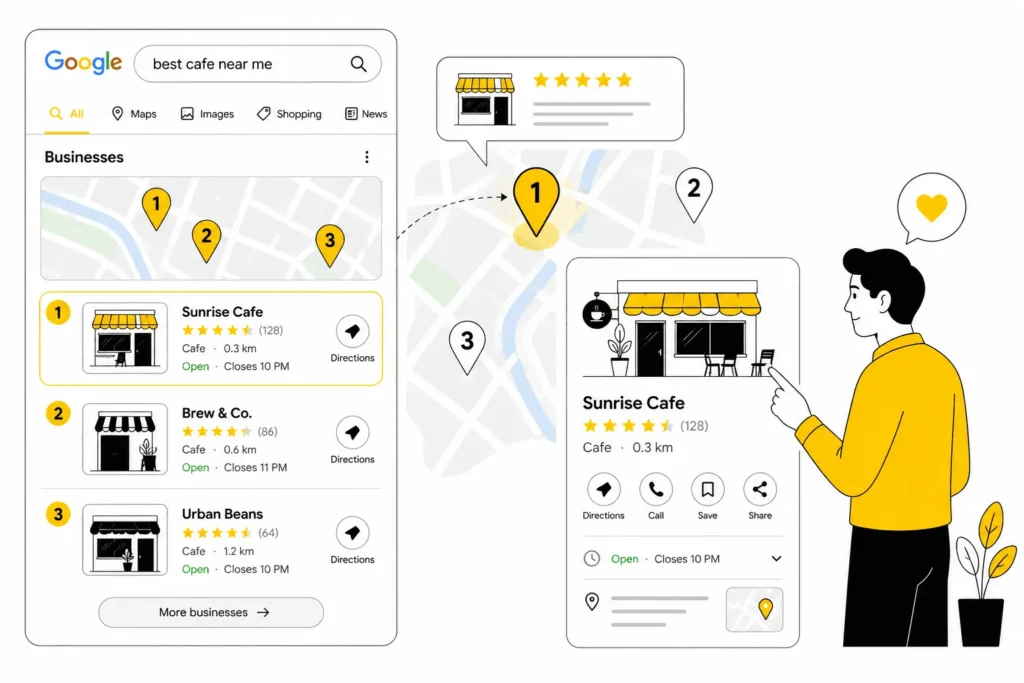
When someone searches “dentist near me” or “tiffin service in Kothrud,” Google doesn’t show websites first — it shows a map with three local businesses: photos, ratings, distance, and a call button. That’s the Local 3-Pack, and it sits above every website result.
The businesses in that box get 40–60% of all clicks from that search. Everything below it — including websites with strong SEO — splits the rest.
In 2026, Google’s AI Overviews also pull directly from GBP data. When someone asks “which coaching centre in Rajinder Nagar has the best reviews?”, the AI answer comes from GBP listings, not websites. If your profile is incomplete or missing, you don’t exist in that answer.
| The ₹0 Math A fully optimised GBP generates free local traffic roughly equivalent to ₹30,000–₹50,000/month in Google Ads spend for a typical Indian small business. It costs nothing to set up and nothing to maintain — there’s no higher-ROI marketing action available to a local business in India. |
How to Set Up Your Google Business Profile: Step-by-Step
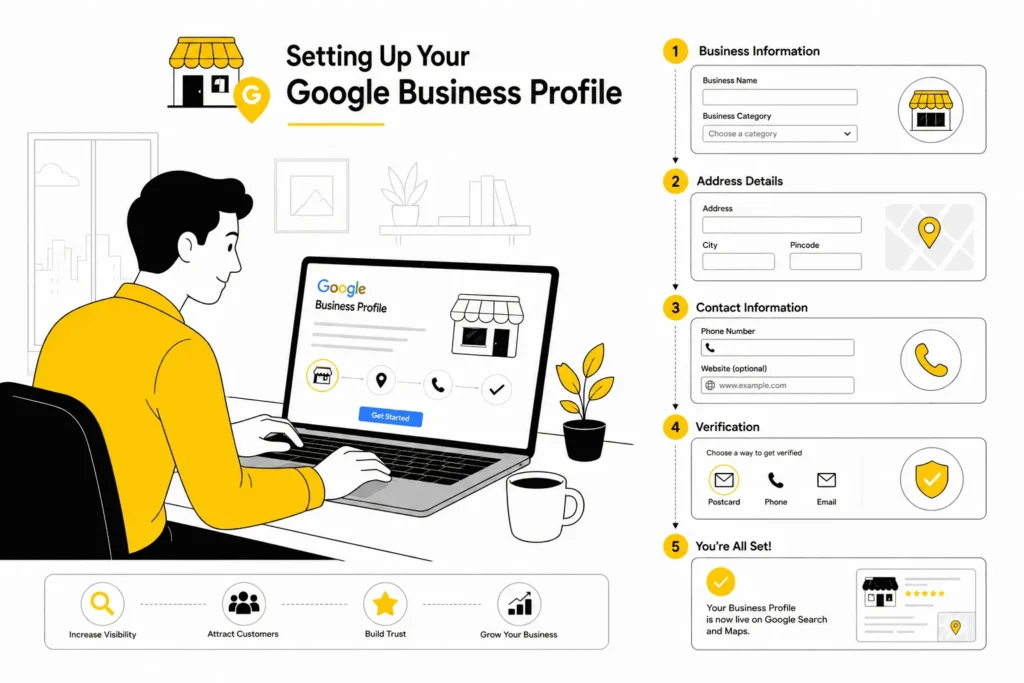
Go to business.google.com and sign in with a Google account — use a business email if you have one, not a personal Gmail you use for other things.
Before creating a new listing, search for your business name first. It may already exist in Google’s database with customer reviews attached. If it does, claim it — don’t create a duplicate, since duplicate listings confuse Google and can hurt your ranking.
- Enter your business name exactly as it appears on your signage. No keywords, no city name, no “Best” or “No. 1.” Adding “Best Dental Clinic Delhi” to your name field violates Google’s guidelines and can get your profile suspended.
- Select your primary business category. This is one of the most important decisions you’ll make — covered in detail below. The wrong category means you don’t appear in the right searches.
- Add your address or service area. Physical shop or office: enter your full address with PIN code and a landmark. Home-based or mobile service: select “I deliver goods and services to my customers” and set a service area instead — your home address stays hidden.
- Add your phone number and website. Use a mobile number that’s always reachable. No website yet? Link to your Instagram page or a WhatsApp link (wa.me/91XXXXXXXXXX) temporarily — better than leaving it blank.
- Set your business hours carefully. Include lunch breaks if you close, and add Saturday/Sunday hours separately. A customer who calls during hours your GBP says you’re open — but you’re not — will leave a negative review.
- Write your business description (750 characters max). Mention your top 2–3 services, your area, and what makes you different. Avoid promotional language — Google rejects descriptions that read like ads.
- Upload your first 5 photos. One exterior shot, one interior, one team photo, and two service or product photos. More on this in the 30-day plan below.
- Choose your verification method. This is where many Indian businesses get stuck — see the troubleshooting section next before you proceed.
Google Business Profile Verification in India: Common Problems and Fixes
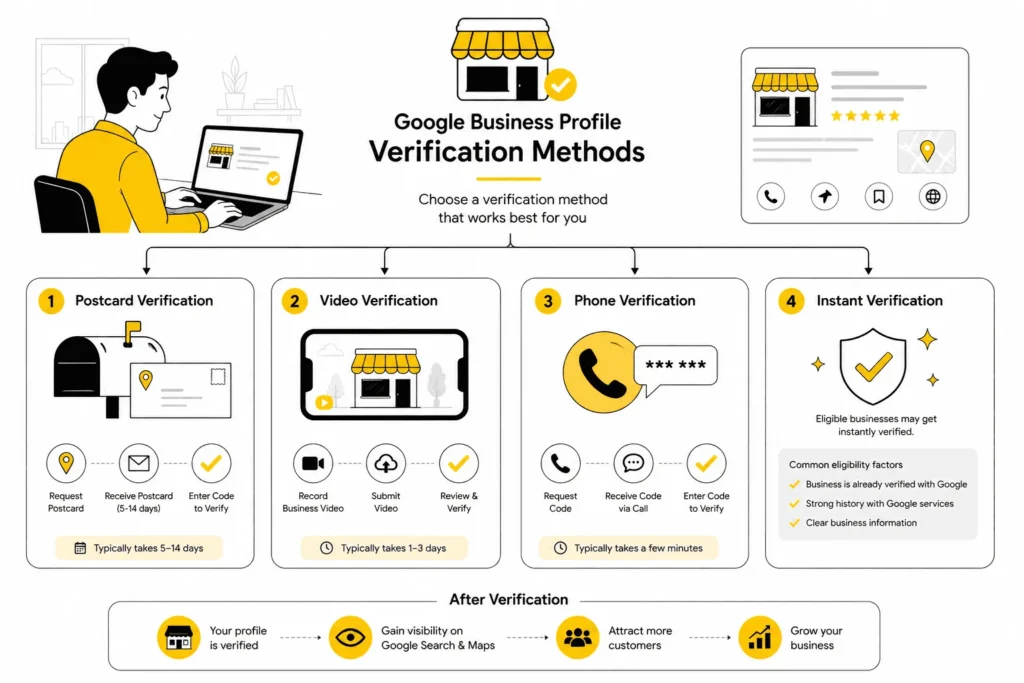
Verification is the #1 point where Indian small businesses give up. The postcard doesn’t arrive. The address gets flagged. The profile sits unverified for weeks. Here’s what can go wrong, and how to fix each one.
Your verification options:
- Postcard: Google mails a PIN to your address. Takes 5–14 days. In smaller towns, market complexes, and newer residential colonies, postcards frequently don’t arrive — this is common, not a sign you did something wrong.
- Video call: A Google representative video calls you and asks you to show your exterior signage, interior, and proof you work there. Usually takes 3–5 business days to schedule, and is often faster and more reliable than postcard for Indian addresses.
- Phone/SMS: Not available for every business type, but instant when offered.
- Instant verification: Available if you’ve already verified your website domain in Google Search Console using the same Google account.
| ⚠️ The Problem | ✅ The Fix |
| Your address keeps getting flagged or not matching — common when there are multiple ways to write the same address | Use the exact address format from your GST certificate or rental agreement as your canonical address. Use it identically on your GBP, website, and every directory listing |
| You’re in a shared building or market row, and Google flags a duplicate because another business is already listed there | Add your specific unit number, shop name, or floor clearly — make the distinction from neighbouring units explicit |
| You run a home-based business and don’t want your home address public | Select “I deliver goods and services to my customers” and enter your service area (PIN codes or localities) instead — your address stays hidden |
| The postcard hasn’t arrived after 14 days — common in newer colonies and smaller towns | Request a new postcard from your dashboard (up to 3 times). After 3 failed attempts, switch to video verification, or contact GBP support |
| Your profile got suspended — flagged as spam, a duplicate, or a policy violation | Remove keywords or city names from your business name field. Confirm your address matches a real location. Submit a reinstatement request with exterior and signage photos as proof |
Choosing the Right Google Business Profile Category for Your Business
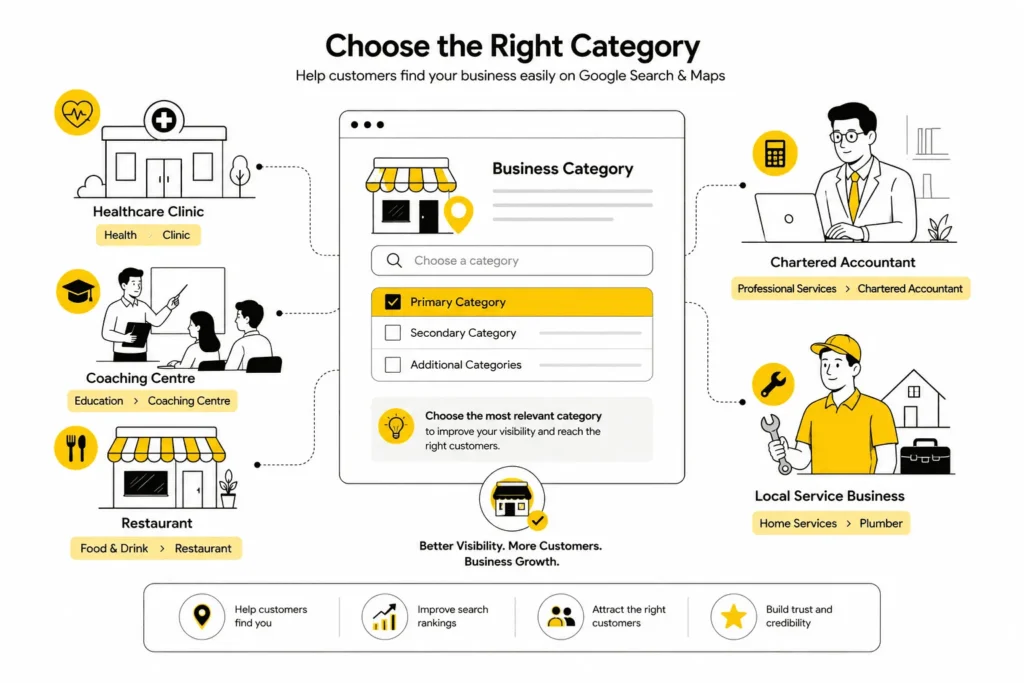
Your primary category is one of the biggest local ranking factors there is. Most Indian businesses pick something too broad, then wonder why they don’t appear for specific searches.
| Your Business | ✅ Use This Category | ❌ Not This |
| Dental Clinic | Dental Clinic | Medical Clinic |
| Physiotherapy Centre | Physical Therapy Clinic | Clinic |
| Coaching Centre (UPSC/JEE) | Tutoring Service | School |
| Home Tiffin Service | Meal Delivery Service | Restaurant |
| Beauty Parlour | Beauty Salon | Spa |
| Event Planner / Decorator | Event Management Company | Event Venue |
| Chartered Accountant | Chartered Accountant | Financial Consultant |
| Home Baker | Home Goods Store | Bakery |
| Plumber / Electrician | Plumber / Electrician | Contractor |
| Real Estate Broker | Real Estate Agency | Property Management Company |
| Tailor / Boutique Stitching | Clothing Alteration Service | Clothing Store |
| Yoga / Fitness Studio | Yoga Studio / Fitness Centre | Wellness Centre |
| Driving School | Driving School | School |
| Pest Control | Pest Control Service | Home Services Company |
After your primary category, add up to 9 secondary categories to expand the searches you appear in. A dental clinic’s primary might be “Dental Clinic,” with secondaries like “Cosmetic Dentist,” “Orthodontist,” and “Paediatric Dentist” added to capture those specific searches too.
Profile Sections Most Indian Businesses Leave Empty
Getting your profile live is the beginning, not the end. These four sections separate a GBP that just exists from one that actively brings in customers — and most businesses ignore all of them.
Google Posts: Free Weekly Marketing Almost Nobody Uses
Google Posts appear directly in your listing in search results — free offers, events, or updates. Businesses that post regularly rank higher than inactive ones. Post once a week, keep it short, one clear message and one action:
- Clinic: “Sunday OPD now available 10am–1pm. No appointment needed for general consultation.”
- Coaching centre: “New UPSC Foundation batch starting 1st July. Only 25 seats. Call to register.”
- Restaurant: “Today’s lunch special: Rajma Chawal Thali at ₹99. Available 12–3pm only.”
- Tailor: “Diwali orders open. Salwar suits ready in 7 days. WhatsApp us your design.”
Questions & Answers: Seed Your Own Before a Stranger Does
The Q&A section is public — anyone can ask, and anyone can answer. Leave it unattended, and potential customers get answers from strangers, or no answer at all, which is worse. Log into your GBP listing and add the 5 most common questions customers ask, then answer them yourself:
- Coaching centre: “Do you offer weekend batches?” / “Is a free demo class available?” / “Do you provide printed study material?”
- Clinic: “Do you take walk-in patients?” / “Is parking available?” / “Do you accept cashless insurance?”
- Any local service: “What areas do you serve?” / “What is your typical response time?” / “Do you charge for site visits?”
Photos: More Than You Think, More Often Than You Think
Profiles with 10+ photos get 42% more direction requests and 35% more website clicks than profiles with fewer than 3. You need one exterior shot, one interior, one team photo, and service or product photos — add one new photo a week. New equipment, a Diwali redecoration, a new team member, a finished project: photograph it and add it. Active profiles signal a thriving business. One firm rule: never use stock photos — Google can detect them, and customers distrust them on sight.
Attributes: The Hidden Filters Indian Customers Use
Attributes appear as small icons on your listing — “Accepts UPI,” “Home Delivery Available,” “Women-Led Business,” “Wheelchair Accessible,” “Online Appointments” — and customers filter by them on Google Maps. In your GBP dashboard, enable every attribute that applies. For most Indian businesses, the highest-value ones are Accepts UPI, Home delivery (if applicable), Online appointments, and Outdoor seating (for food businesses).
NAP Consistency: Why Your JustDial Listing Affects Your Google Ranking
NAP stands for Name, Address, Phone number. Google cross-checks your GBP information against every other place your business is listed online. Inconsistencies lower Google’s confidence in your listing — and your ranking follows.
This matters especially in India because Indian addresses are notoriously flexible. “Shop 12, Main Market,” “12, Main Bazaar, Near Axis Bank,” and “Opp. Post Office, Main Road” might all describe the same shop — but Google treats them as three different addresses.
What to do:
- Pick one official address format — use your GST certificate or shop rental agreement as the reference — and use it identically everywhere.
- Audit these platforms now: JustDial, Sulekha, IndiaMART, your Facebook business page, Instagram bio, and your website’s contact page and footer.
- Keep phone numbers consistent. If you switched from a landline to mobile, or changed your WhatsApp Business number, update every listing.
- Keep your business name identical everywhere — don’t add “Best” to your JustDial listing while your GBP stays plain. Different names across platforms confuse Google.
| Quick NAP Audit — Check These Right Now Google Business Profile · Your website’s contact page and footer · JustDial · Facebook business page · Sulekha (service businesses) · IndiaMART (B2B/product businesses) · Instagram bio |
How to Get Your First 20 Google Reviews Using WhatsApp
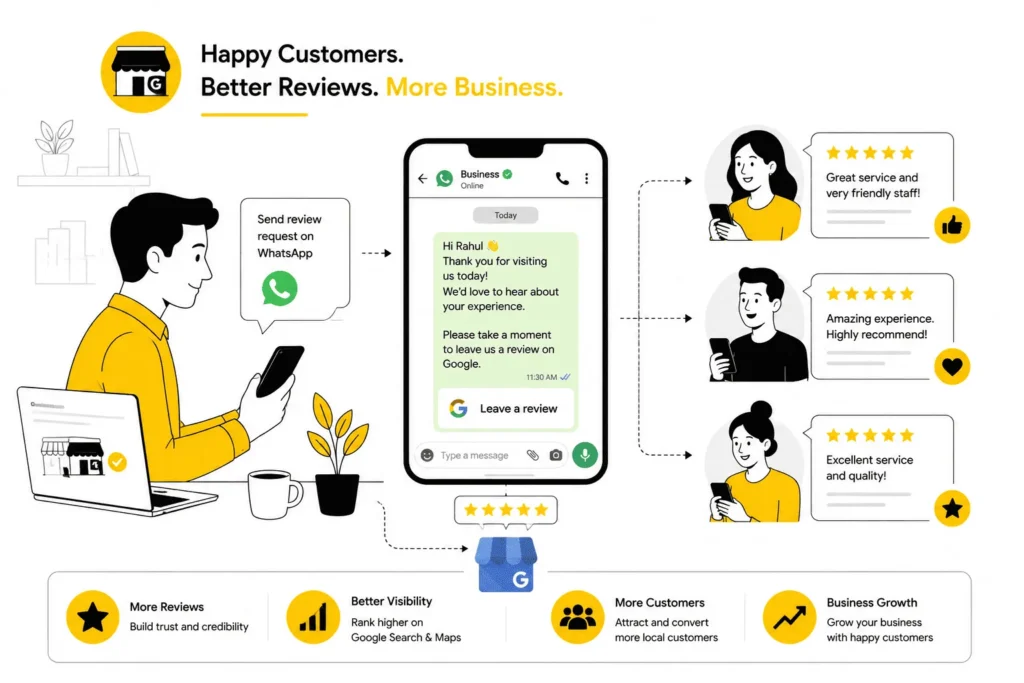
Reviews are the currency of local search. A business with 4.5 stars and 40 reviews will consistently outrank one with 5 stars and 3 reviews. Most Indian businesses have fewer than 10 reviews — getting to 20 puts you ahead of most local competitors.
Step 1 — Get your direct review link. In your GBP dashboard, click “Get more reviews” and copy the link. It takes customers straight to the review box, no searching required, and roughly doubles your review conversion rate on its own.
Step 2 — Message your happiest existing customers first. Scroll back through your last 3 months of WhatsApp conversations and find customers who said something positive — “bahut achha tha,” “thank you so much,” “will definitely come again.” Message them first.
| Copy This WhatsApp Message Hi [Name], thank you for being our customer! 🙏 If you have 30 seconds, a Google review would mean the world to our small business. Here’s the direct link: [your review link] Thank you so much — it really helps us grow! 😊 |
Step 3 — Ask in the moment for service businesses. Plumbers, electricians, and home service providers should ask right after the job, while still with the customer: “Sir/Madam, hum ek chhoti si business hain — agar aap ek Google review de sakein toh bahut help hogi. Main abhi WhatsApp pe link bhejta hoon.” Most people will say yes.
| What Not to Do Never offer discounts or gifts in exchange for reviews — this violates Google’s policy and can get your profile suspended. Never use a review generation service that posts fake reviews; Google detects them and can remove all your reviews in one sweep. Never ask multiple customers to review from the same location or device — Google flags this as suspicious. |
Respond to every review. Thank positive reviewers by name and mention the service; for negative reviews, stay calm, apologise, and offer to resolve things offline. It signals to Google — and to every potential customer reading your profile — that you’re responsive and professional.
Your First 30 Days After Setup: A Simple Action Plan
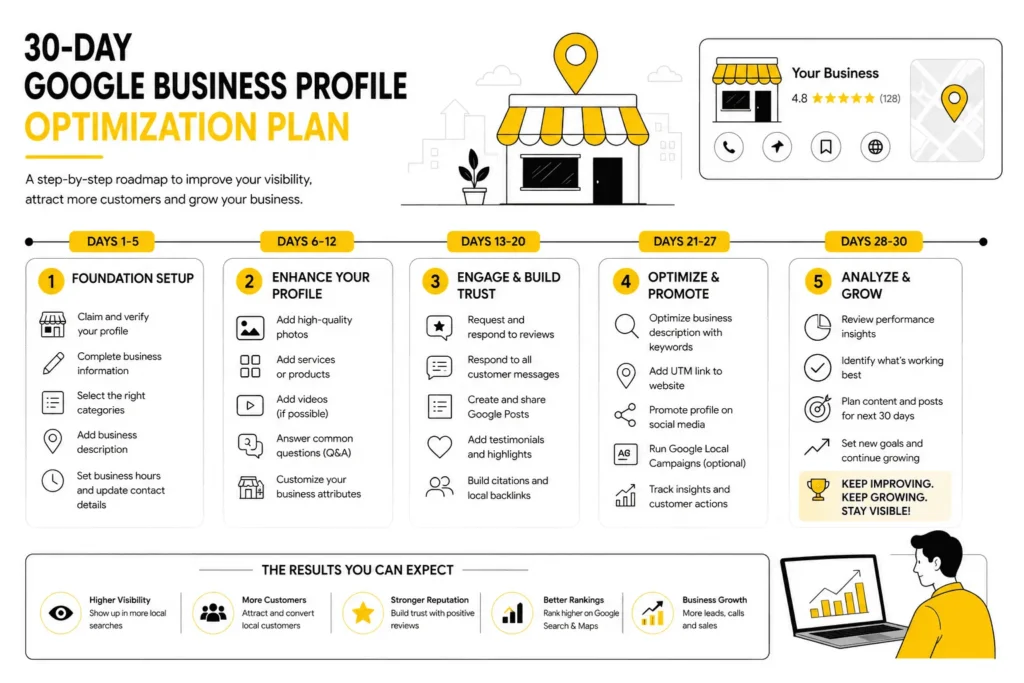
Most businesses set up their GBP and forget about it for months — which is exactly why they don’t rank. Here’s a 30-day plan that takes about 15 minutes a week and makes a measurable difference.
| When | What to Do | Why It Matters |
| Days 1–7 | Complete all profile sections. Upload 10 photos. Add 5 services with descriptions. Enable all relevant attributes. Add 5 Q&As. Send your review link to 10 happy existing customers via WhatsApp | A complete profile ranks higher than an incomplete one — Google measures profile completeness as a ranking signal |
| Days 8–14 | Publish your first Google Post. Check GBP Insights to see how many searches found you and which keywords they used. Audit NAP consistency across JustDial, website, and Facebook | First real data — you’ll see which searches bring traffic, which tells you what to optimise next |
| Days 15–21 | Follow up once with customers who haven’t reviewed yet. Add 3–5 more photos. Send your review link to 10 more customers | Reviews compound — 5 reviews in 3 weeks signals an active, trustworthy business to Google’s algorithm |
| Days 22–30 | Publish your second Google Post. Compare Insights from Week 1 vs. Week 4. Use the top search query bringing people to your listing in your services or description | You now have real data — optimising based on actual searches beats guessing by a wide margin |
| Month 2 onward | One Google Post a week. One new photo a week. Respond to all reviews within 24 hours. Update Special Hours before every public holiday. Check Insights monthly | Consistent activity drives consistent ranking improvement — GBP rewards businesses that stay active |
Using Your GBP During Indian Festive Seasons
Indian buying peaks sharply during festive and seasonal windows. Businesses that update their GBP proactively get dramatically more visibility during these periods — and most competitors do nothing.
| Season | When | What to Update |
| Diwali / Navratri | Oct–Nov | Special hours, an offer Google Post, festive description update, new decorated-premises photos |
| Wedding Season | Nov–Feb | Wedding-specific services, a bridal/catering package Post, photos of wedding work |
| School/College Admissions | Mar–May | Coaching centres: Post announcing batch dates, updated services with new batch details, classroom photos |
| Summer Vacation | May–Jun | Activity classes, fitness, coaching: Post summer batch info, extended hours where applicable |
| Eid / Christmas / New Year | Year-round | Update Special Hours before the holiday — being marked open when you’re closed guarantees a negative review |
The single most neglected action is updating Special Hours before holidays. Every year, businesses collect 1-star reviews from customers who showed up on Diwali or a Sunday to find the place closed because Google said it was open. It takes two minutes to update, and it saves a permanent negative review.
FAQs: Google Business Profile for Indian Small Businesses
How long does GBP verification take in India?
Postcard verification takes 5–14 days. Video call verification takes 3–5 business days to schedule. Phone/SMS, when available, is instant. If your postcard hasn’t arrived in 14 days, request a new one from your dashboard — up to 3 times — before switching to video verification.
Can I create a GBP without a physical address?
Yes. Service-area businesses — plumbers, tutors, caterers, home services — can set a service area instead of a physical address. During setup, select “I deliver goods and services to my customers,” enter the localities or PIN codes you serve, and your home address stays hidden.
My profile got suspended — what do I do?
Check your business name for keywords or city names you may have added, and remove them. Confirm your address is specific and matches official documents. Submit a reinstatement request through the GBP Help Center at support.google.com/business, with exterior and interior photos as proof your business is real and operating.
How many Google reviews do I need to appear in the Local 3-Pack?
There’s no fixed number — Google weighs review count, average rating, recency, and response speed together. In most Indian cities, 15–25 genuine 4.5+ star reviews is enough to rank in the local 3-pack for most categories. For competitive categories like dental, coaching, and real estate, aim for 40–50+.
Does GBP work for home-based businesses in India?
Absolutely. Home tiffin services, tutors, home bakers, tailors, and freelancers all benefit from GBP without showing a home address. Set a service area, optimise the profile fully, and collect reviews. Many home-based businesses in India outrank shops and offices in their area purely on the strength of their GBP profile.
Final Thoughts
Your Google Business Profile is the one place where a free, 30-minute setup can genuinely change how many customers find you every day. You don’t need a website, an ad budget, or a marketing agency — you need a complete profile, a handful of honest reviews, and the habit of updating it once a week. Do those three things consistently for 60–90 days, and your local search visibility will improve, often dramatically.
Start with Step 1 today. Set up the profile, get it verified, and send your review link to five customers by the end of this week. That’s all it takes to begin.
| Want Help Setting This Up or Getting It Right? If you’ve hit a verification problem, inherited a messy listing, or just want someone to set this up properly from the start, book a free 15-minute GBP audit call at leegrowth.com. We’ll review your existing listing (or set up a new one), tell you exactly what needs fixing, and give you a clear action plan. No sales pitch, no obligation. If you need professional assistance, explore our Local SEO services. |
For official guidance on verification methods and profile management, refer to Google’s Business Profile Help Center.
Written for leegrowth.com · June 2026 · Updated regularly

I’m Leena Kalyana, a Delhi-based freelance digital marketer and graphic designer. I work across SEO, content marketing, social media, and digital design. I’m interested in helping businesses build a stronger online presence through practical SEO strategies, useful content, and creative digital marketing.