


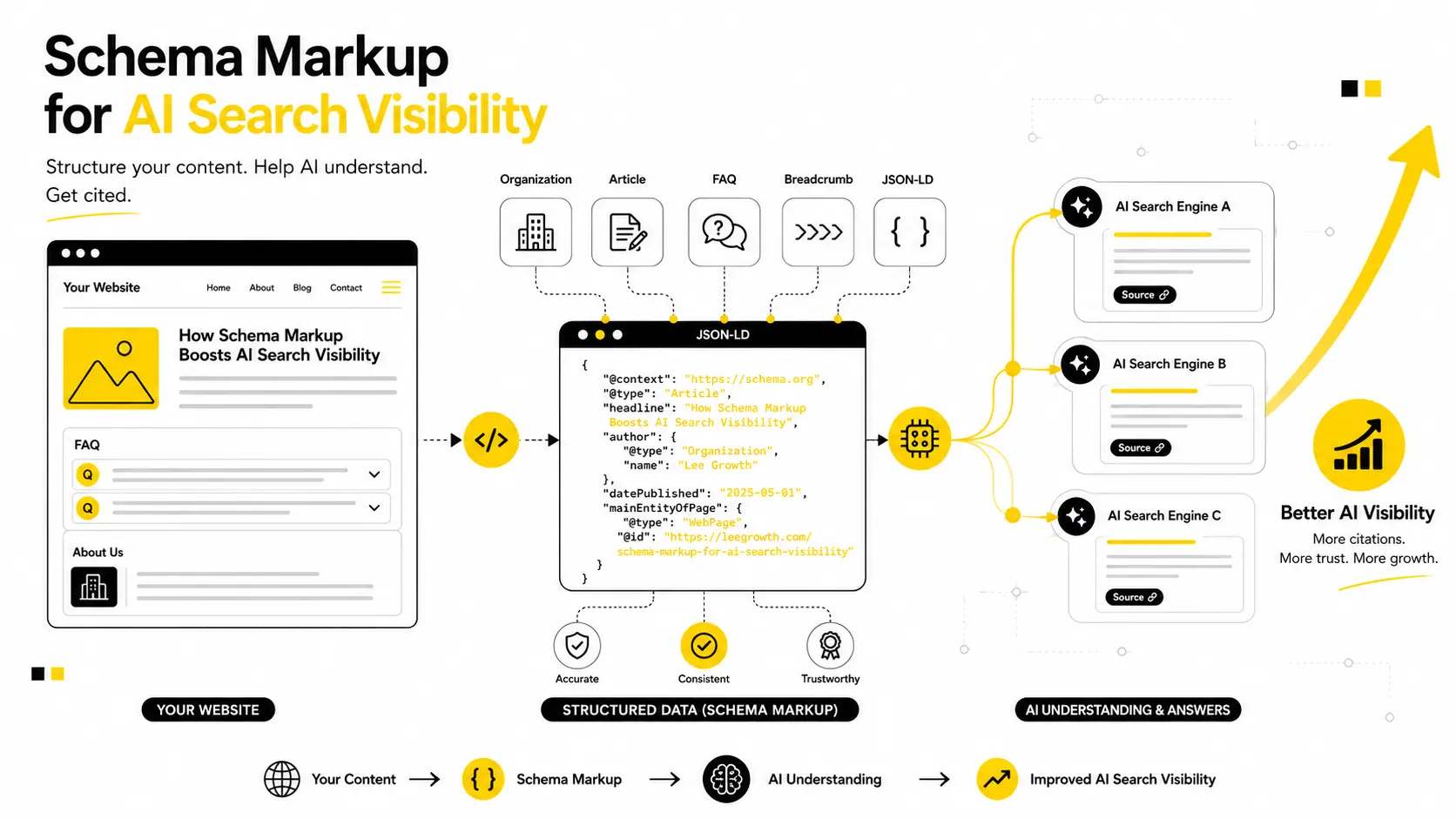
ChatGPT, Google AI Overviews, and Perplexity don’t read your website the way a person does. They rely on structure to understand what a page is actually about — and schema markup is one of the clearest signals you can give them.
This guide covers schema markup for AI search visibility from a practical angle: what’s actually confirmed to work, what’s still unproven, the schema types worth your time, a complete working code example, and — importantly — how to check whether AI systems are even reading your schema in the first place.
No inflated stats. No copy-pasted checklist. Just what’s real, and what’s still marketing noise.
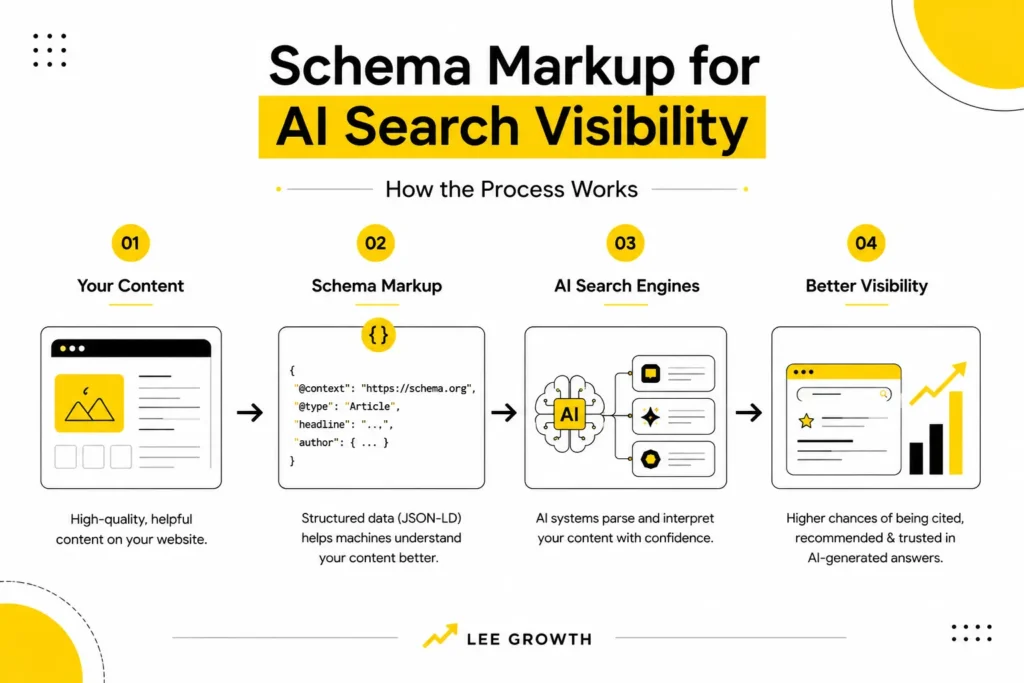
When you upload this image in WordPress, set the image Alt Text field to your focus keyword: “schema markup for AI search visibility”. That single field is what Rank Math checks — it won’t read alt text typed elsewhere in the document.
Done right, schema markup for AI search visibility isn’t a one-time technical checkbox — it’s an ongoing part of how AI systems decide whether your content is worth showing.
What Is AI Search Optimization?
| AI search optimization (also called generative engine optimization, or GEO) is the practice of structuring website content so AI systems — ChatGPT, Google AI Overviews, Perplexity, and similar tools — can accurately understand, summarize, and cite it in their answers. |
Traditional SEO optimizes for keyword matching and backlinks. AI search optimization goes a step further: it optimizes for how clearly a machine can identify what your content is, who wrote it, and whether it can be trusted enough to quote.
Schema markup is the technical backbone of that clarity. It doesn’t replace good content — it labels the content you already have so AI systems don’t have to guess. If you haven’t covered the basics yet, it’s worth pairing this with our on-page SEO checklist before layering AI-specific tactics on top.
Internal link placeholder above — replace the URL with your actual published post before going live.
Does Schema Markup Help AI Search? Here’s What’s Actually Confirmed
Before going further, it helps to be precise about what schema markup for AI search visibility can and can’t do — because most of what’s written about it overstates the second part.
| Short answer: Yes, schema markup helps AI systems interpret your content faster and with less ambiguity. But no independent, verifiable study proves it directly increases how often you’re cited — despite the specific-sounding percentages floating around online. |
What we actually know
- Major AI platforms have publicly acknowledged that they process structured data when it’s available, because it reduces the guesswork involved in figuring out what a page means.
- Schema doesn’t create relevance — it clarifies relevance that already exists. A well-marked-up page of thin content still won’t get cited over a well-written page without schema.
- Content-parity is the one rule repeated across every credible source: whatever you mark up must also be visible on the page, in the same words. Mismatches are treated as a quality problem, not a technicality.
What’s still unproven
You’ll see specific figures repeated across SEO blogs — “44% increase in citations,” “36% visibility boost,” “300% more accurate.” None of these trace back to a public, replicable study. Treat them the way you’d treat any unverified marketing stat: interesting, not actionable.
The honest position, and the one worth building your strategy around, is this: schema is a confidence signal, not a citation guarantee. It helps AI systems trust and parse your content — it doesn’t buy you a spot in the answer.
How Do AI Search Engines Use Structured Data?
Most AI search systems follow a similar pipeline when answering a query:
- A query comes in, and the system identifies what information would answer it.
- It retrieves candidate pages — through its own index or a live web search.
- It parses each page, using structured data where available to identify entities (who, what, where) without relying purely on inference.
- It ranks sources by how confidently it can extract accurate, consistent information.
- It generates an answer, sometimes citing or linking the sources it trusted most.
Schema markup mainly affects step 3 and step 4 — it speeds up parsing and raises confidence. It has little influence over step 1 or step 2, which is why schema alone never fixes a content or authority problem.
Can ChatGPT Read Schema Markup?
| Yes — when ChatGPT browses the live web (through search-enabled responses), it can access and parse JSON-LD schema on a page the same way it processes visible text. It does not apply to answers generated purely from training data, since those don’t involve fetching your page in real time. |
This distinction matters. If you’re optimizing for ChatGPT visibility, you’re really optimizing for the moments it performs a live browse or search — not for its static training knowledge, which you can’t influence after the fact.
Does Google AI Overview Use Schema Markup?
Google AI Overviews draws from the same index and the same structured data signals Google has used for rich results for years. If your schema already qualifies a page for rich snippets, it’s already in a good position to be considered for an AI Overview.
The difference is that AI Overviews synthesizes multiple sources into one answer, rather than showing a single rich snippet. Clear Organization, Article, and FAQPage schema make it easier for Google to attribute a specific claim to your page inside that synthesis.
Which Schema Markup Is Best for AI SEO?
Not every schema type contributes equally to schema markup for AI search visibility. These four consistently show up as the ones AI systems rely on most for informational and business content:
| Schema Type | What It Does | Best For |
| Organization | Establishes your brand identity — name, logo, contact info, sameAs profiles. | Homepage, About page |
| Article | Identifies a page as an article with author, publish date, and headline. | Blog posts, guides |
| FAQPage | Marks up question-and-answer content in a machine-readable format. | FAQ sections, help content |
| HowTo | Breaks a process into numbered, structured steps. | Tutorials, step-by-step guides |
| Product / Review | Adds pricing, availability, and rating data. | Ecommerce, service pages |
| BreadcrumbList | Shows page hierarchy and site structure. | Any multi-level site |
Suggested image: A simple flat icon grid showing the six schema types above. Alt text: “Schema markup types for AI search visibility.”
How to Use Schema Markup for AI Search (Step-by-Step)
This is the process we recommend for implementing schema markup for AI search visibility on any page. Two references are worth bookmarking before you start: Schema.org’s official getting-started guide and Google’s structured data documentation. Both are maintained directly by the organizations that define and consume these standards.
- Audit your top pages. Run your highest-traffic and highest-intent pages through Google’s Rich Results Test to see what schema, if any, already exists.
- Pick one schema type per page based on its actual purpose — don’t add FAQPage to a page with no visible FAQs.
- Write the JSON-LD by hand or with a generator, but always check it against the visible page content before publishing.
- Use a single @graph block to connect multiple schema types on one page, rather than scattering separate script tags.
- Validate, publish, and re-check after any content update.
A complete, working example
Here’s what a real page — combining Organization, Article, FAQPage, and Breadcrumb schema — looks like as one connected @graph block:
| <script type=”application/ld+json”> { “@context”: “https://schema.org”, “@graph”: [ { “@type”: “Organization”, “@id”: “https://example.com/#organization”, “name”: “Example Company”, “url”: “https://example.com”, “logo”: “https://example.com/logo.png”, “sameAs”: [“https://linkedin.com/company/example”] }, { “@type”: “Article”, “@id”: “https://example.com/blog/post/#article”, “headline”: “Schema Markup for AI Search Visibility”, “author”: { “@type”: “Person”, “name”: “Author Name” }, “publisher”: { “@id”: “https://example.com/#organization” }, “datePublished”: “2026-08-01”, “dateModified”: “2026-08-01” }, { “@type”: “FAQPage”, “@id”: “https://example.com/blog/post/#faq”, “mainEntity”: [ { “@type”: “Question”, “name”: “Does schema markup help AI search?”, “acceptedAnswer”: { “@type”: “Answer”, “text”: “Yes, it helps AI systems parse and trust content faster, though it does not guarantee citation.” } } ] }, { “@type”: “BreadcrumbList”, “itemListElement”: [ { “@type”: “ListItem”, “position”: 1, “name”: “Home”, “item”: “https://example.com” }, { “@type”: “ListItem”, “position”: 2, “name”: “Blog”, “item”: “https://example.com/blog” } ] } ] } </script> |
Notice that the FAQ answer text matches, word for word, what should appear visibly on the page. That consistency is what separates schema that helps from schema that gets flagged.
How to Add Schema Markup to WordPress (and Other Platforms)
- WordPress: Yoast SEO and RankMath both include a schema/JSON-LD field per page — paste your @graph block there instead of editing theme files directly.
- Shopify: Add the script through Theme Code Editor, inside theme.liquid, or via a metafield if you want it page-specific.
- Webflow: Use the page settings’ “Custom Code” section under the head code panel.
- Custom or headless sites: Inject the JSON-LD block server-side in the <head>, or through Google Tag Manager if a developer isn’t available.
Whichever platform you use, the placement doesn’t affect how it’s read — consistency and content-matching do. For a deeper walkthrough of getting a WordPress site AI-ready beyond schema, see our technical SEO audit guide.
Internal link placeholder above — replace with your actual published post URL.
How to Confirm AI Is Actually Reading Your Schema
This is the step almost every other guide skips. Adding schema means nothing if the AI crawler never reaches it.
Check your robots.txt first
Confirm you aren’t accidentally blocking the crawlers that matter. Look for entries covering GPTBot, ClaudeBot, PerplexityBot, Google-Extended, and Bingbot — a blanket disallow rule written for an old bot can silently block all of them.
Look for AI crawler activity in your logs
Check server logs or an analytics tool that tracks bot traffic for hits from the user-agents above. If they’ve never visited, no amount of schema will matter until they can.
Ask the AI directly
Query ChatGPT, Perplexity, or Google directly about your page’s topic and see whether your brand or content is surfaced or cited. This is the simplest real-world test of whether your efforts are translating into visibility.
Common Schema Markup Errors (and How to Fix Them)
| Error | Likely Cause | Fix |
| Missing required field | A required property (e.g., “image” on Article) was left out. | Check Schema.org’s required fields for that type and fill them in. |
| Content mismatch | Schema text doesn’t match what’s visible on the page. | Edit the schema or the visible copy so they match exactly. |
| Duplicate @id | Multiple schema blocks reused the same @id value. | Give each entity a unique @id anchored to its URL and fragment. |
| Unverified aggregateRating | Review schema shown with no visible reviews on the page. | Remove the schema until real, visible reviews exist. |
| Invalid nesting | A schema type placed inside another it doesn’t belong under. | Check Schema.org’s type hierarchy before nesting entities. |
Schema Markup Maintenance Checklist
- Update dateModified any time you substantially edit a page — stale timestamps reduce AI confidence in the content.
- Re-validate schema quarterly using Google’s Rich Results Test.
- Update Product or pricing schema immediately when prices or availability change.
- Recheck robots.txt whenever you update your CMS, plugin, or hosting setup — configuration changes can silently reintroduce a blocked crawler.
- Assign one owner (not “whoever remembers”) to review schema alongside routine content audits.
What Schema Markup Won’t Do for You
Schema markup won’t fix thin content, won’t create authority you haven’t earned, and won’t guarantee a citation in any AI-generated answer. It’s a clarity tool, not a ranking shortcut.
The pages that actually get cited combine three things: content genuinely worth citing, technical access for AI crawlers, and schema that makes both easy to verify. Skip any one of the three and the other two won’t compensate.
Frequently Asked Questions
Does schema markup help AI search?
Yes. Schema markup for AI search visibility helps AI systems parse and trust your content faster, but it doesn’t guarantee your content will be cited.
Which schema markup is best for AI SEO?
Organization, Article, FAQPage, and HowTo cover most informational content. Product and Review schema matter most for ecommerce.
How do AI search engines use structured data?
They use it to identify entities and relationships in a page during parsing, which raises their confidence when deciding what to cite.
Can ChatGPT read schema markup?
Yes, when it performs a live browse or search. It can’t read schema for answers generated solely from its training data.
Does Google AI Overview use schema?
Yes. AI Overviews draws on the same structured data signals Google has long used for rich results.
How to add schema markup to WordPress?
Use a plugin like Yoast SEO or RankMath, which includes a dedicated field for pasting JSON-LD schema per page.
What schema types improve AI visibility?
Organization, Article, FAQPage, HowTo, and — for ecommerce — Product and Review schema show the most consistent impact.
Is schema markup important for generative AI?
It’s important as a clarity signal. It’s not important as a guaranteed ranking or citation factor, and shouldn’t be treated as one.
How does structured data affect AI search?
It reduces ambiguity during parsing, which can raise an AI system’s confidence in citing accurate, well-labeled content over unclear content.
What is AI search optimization?
It’s the practice of structuring content — including schema markup — so AI systems can accurately understand, summarize, and cite it.
Key Takeaways
Getting schema markup for AI search visibility right comes down to a handful of habits, repeated consistently:
- Schema markup helps AI systems understand your content faster — it does not guarantee citation, regardless of what inflated stats claim.
- Content parity (schema matching visible text) is the single most consistent rule across every credible source.
- Verifying that AI crawlers can actually reach your schema matters as much as writing the schema itself.
- Organization, Article, FAQPage, and HowTo cover most content needs — add Product/Review only for ecommerce.
- Schema is a clarity layer on top of good content, not a substitute for it.

I’m Leena Kalyana, a Delhi-based freelance digital marketer and graphic designer. I work across SEO, content marketing, social media, and digital design. I’m interested in helping businesses build a stronger online presence through practical SEO strategies, useful content, and creative digital marketing.